TL;DR: Outbound remote access lets MSPs reach client devices through an encrypted connection that starts inside the client’s network and reaches out, instead of opening inbound ports for traffic to come in. The result: a smaller attack surface (nothing public to scan), access that works even behind CGNAT and locked-down firewalls, faster onboarding with no port forwarding, and one consistent method across every client. No-IP Public Tunnels is built for this.
If you’ve ever burned an afternoon trying to talk a client through router settings just to reach one device, this one’s for you.
Outbound remote access flips the usual approach on its head. Instead of waiting for a connection to come in from the public internet, the device you want to reach starts an encrypted connection that goes out from inside the client’s network. That one change quietly solves most of the headaches MSPs deal with every day: open ports, fragile router rules, blocked inbound traffic, and networks you don’t actually control.
For a team juggling dozens or hundreds of client environments (if not more), the wins stack up fast: less exposure, quicker onboarding, and one access method that works the same way everywhere. Let’s walk through why outbound remote access is becoming the go-to for modern MSPs, and what it actually changes day to day.
Understanding Outbound Remote Access
What Is Outbound Remote Access?
Outbound remote access is a method where the device or service you want to reach kicks off an encrypted connection out to a secure broker, instead of sitting there accepting connections from outside. You then reach it through that established tunnel, usually with nothing more than a browser-based URL.
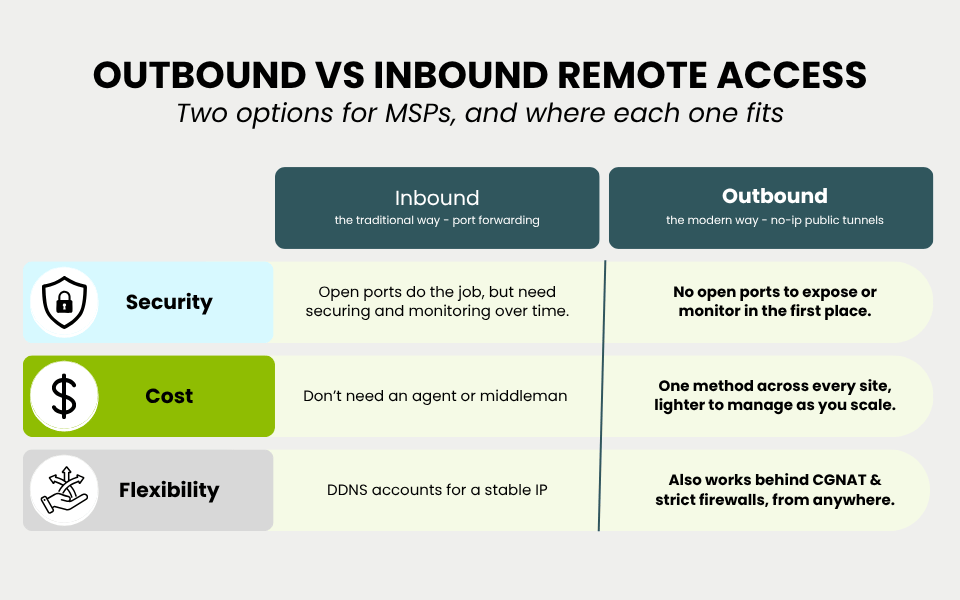
It’s the inversemirror image of inbound remote access. With inbound, you open a port on the client’s router or firewall and point it at an internal device so outside traffic can find its way in. Outbound access skips all of that, because firewalls almost always wave outbound traffic through, even as they get stricter and stricter about what they let in.
The short version: inbound access asks the network to let the outside world in. Outbound access reaches out from the inside, so there’s nothing sitting exposed for someone to find.
Why Outbound Remote Access Is Becoming Essential for MSPs
The networks you support have changed, and not in your favor. CGNAT, ISP-managed routers, locked-down firewalls, and cloud-managed setups now make inbound connectivity tough (or flat-out impossible) at a growing chunk of client sites. Meanwhile, the security bar keeps rising, and every open port is one more thing you have to track, justify, and babysit.
Outbound remote access lines up neatly with both of those shifts. It works in restrictive environments where port forwarding isn’t an option, and it shrinks the attack surface you’re on the hook for. That’s exactly the gap No-IP Public Tunnels was built to close, as a modern alternative to port forwarding that plays nicely with your existing remote access setup.
Enhanced Security with Outbound Remote Access
Avoiding Open Ports and Security Vulnerabilities
Here’s the uncomfortable truth about ports: someone is always knocking. Port scanners comb public IPs around the clock looking for exposed RDP, SSH, and management interfaces, and one misconfigured rule is all it takes to hand a client over to a brute-force attack.
Outbound remote access takes that risk off the table. With no inbound ports open, there’s simply nothing public to scan or attack. Devices stay tucked inside the network and are only reachable through a controlled, deliberate connection. Across a full client base, that’s a lot of doors you no longer have to stand guard over.
Better Control Over Access
Outbound access also gives you a much firmer grip on who reaches what. Connections run through a secure platform and only open up when access is actually requested, instead of sitting there waiting all day. So you can manage and monitor access to client networks and critical systems without ever exposing those systems to the internet.
The payoff is access that’s intentional and auditable. A connection happens because someone deliberately started it through a controlled path, not because a port got left propped open and forgotten.
Leveraging VPNs and Secure Tunnels
Good news: outbound remote access doesn’t ask you to rip out what already works. The outbound tunnel is encrypted, so your data is protected in transit, and it sits comfortably alongside VPNs and other secure connectivity you already have running.
It also points to where remote access is heading. The end goal is Zero Trust Network Access, where no connection is trusted by default and every request is verified before it’s allowed. An outbound tunnel doesn’t get you all the way there on its own, but by shrinking your exposed surface down to controlled, outbound-only connections, it’s a solid first step in that direction.
Increased Flexibility for MSPs
Access to Remote Systems from Anywhere
Outbound remote access means your techs can troubleshoot, patch, and manage client systems without driving out to the site or hopping onto the same network. Because access runs through a browser-based URL instead of IP addresses and firewall rules, anyone on the team can jump into a session from anywhere, using the same steps every time.
That sameness is the magic. You might support a server in a corporate office, a device at a branch location, and a system buried behind a residential ISP connection all in one afternoon, and the network quirks stop being something you have to wrestle with. Even bread-and-butter tasks like remote desktop sessions just work, wherever the device happens to live.
Scalable Access Models
Inbound access has a scaling problem. Every new client site means fresh router rules to set up, document, and maintain, and that workload grows right alongside your customer list.
Outbound access scales a whole lot more gracefully. Spinning up a new site doesn’t mean chasing down router access or waiting on the ISP, so adding clients (or growing inside an existing one) doesn’t pile on configuration work. Our MSP Platform is built around exactly this: one repeatable access method that holds up as your book of business grows.
Reliable Connectivity in Challenging Network Conditions
Consistent Access Behind NAT and CGNAT
One of the biggest perks of outbound remote access is that it works where the old way simply can’t. Plenty of client networks sit behind NAT or CGNAT, where there’s no public IP to forward a port to in the first place. Inbound access? Dead on arrival.
Outbound tunnels route right around the problem by starting the connection from inside the network, so CGNAT and NAT stop being dealbreakers. Access behaves the same whether a device is on a tidy corporate network or hiding behind an ISP-managed connection you’ll never get into.
Resilience in Restrictive and Remote Environments
Outbound access also holds up better in restrictive or out-of-reach spots. Firewalls that slam the door on inbound traffic usually still let outbound connections through, so a tunnel can establish itself where an inbound rule never stood a chance. For clients in remote locations or on tightly managed networks, that reliability is often what lets you fix things remotely instead of sending someone out the door.
The real value of an outbound tunnel is consistency: the connection works, predictably, across environments you don’t control. And for MSP support, where every client network is a little different, that reliability is exactly what matters.
Easier Client Setup and Reduced Maintenance
No Need for Complex Port Forwarding
Port forwarding is a classic source of both setup pain and repeat support tickets. It wants router access, a stable IP, the right rules, and ongoing upkeep as networks shift, and any one of those can quietly fall over.
Outbound remote access just deletes that step. No router changes to coordinate, no calls to the ISP, no port-forwarding rules to keep alive. Setup moves faster because the gnarly parts (NAT traversal, dynamic IPs, firewall behavior) get handled behind the scenes. For you, that’s shorter onboarding and a noticeably quieter ticket queue.
Centralized Access Management
Setup aside, outbound access makes the ongoing stuff easier too. Since connections are brokered through a central platform, you manage and revoke access from one place instead of poking at individual client routers. Permissions live with the access platform, not scattered across a pile of network devices, which keeps things tidy as clients and technicians come and go.
Cost-Effective Solution for MSPs and Clients
Lower Infrastructure Costs
Outbound remote access trims the overhead you’d otherwise be carrying. There’s less leaning on per-site network config, fewer one-off firewall and VPN setups to maintain, and less engineering time lost to chasing connectivity gremlins. Every connectivity ticket you don’t have to open is technician time handed back to the work that actually pays.
Simplified Client Billing
One consistent access method is also a lot easier to package and price. When access works the same way for every client, you can offer remote management as a clean, predictable line item instead of quoting custom network work site by site. That consistency makes for simpler, more predictable billing tied to what you actually deliver.
Outbound Remote Access in Action
Picture a pretty common scenario. A client has a device at a branch office sitting behind a CGNAT connection from their ISP, no public IP, and no router access for you. With inbound remote access, that device is basically a brick from afar, short of a site visit or a frustrating call to the ISP.
With outbound remote access, the device opens an encrypted tunnel out to the access platform, and you connect through a browser-based URL with zero router changes. The tech sorts it out remotely in minutes, the client’s network stays free of any open inbound ports, and the exact same playbook works for every other site you support. No drama.
Ready to make remote access the easy part of your day? No-IP Public Tunnels delivers secure, outbound remote access with no open ports and no router changes. Take a closer look at No-IP Public Tunnels and see how it fits your MSP stack.
Common Questions About Outbound Remote Access
What are the security advantages of outbound remote access for MSPs?
The big one is a smaller attack surface. With no inbound ports open, there’s nothing public for attackers to scan or exploit. Connections are encrypted and only open when access is requested, and devices stay inside the network rather than hanging out on the open internet. It also lines up with Zero Trust principles by keeping access limited to controlled, intentional connections.
How does outbound remote access compare to traditional inbound access?
Inbound access opens a port on the client’s network so outside traffic can get in, which means you need router control, a stable IP, and ongoing rule upkeep. Outbound access flips the direction: the connection starts inside the network and reaches out, so it works without port forwarding and behaves consistently even on networks you don’t control. Inbound still has its place in stable, fully controlled environments, but outbound tends to be the more reliable bet across the messy mix of networks MSPs actually support.
Is outbound remote access suitable for all types of clients?
It fits most client environments, and it’s a lifesaver for the tricky ones, like networks behind CGNAT, ISP-managed routers, or strict firewalls. Clients with stable public IPs and full router control can still use port forwarding where it makes sense, but outbound access gives you one method that works everywhere, which is usually the bigger day-to-day win.
Can outbound remote access be used with existing VPN solutions?
Absolutely. Outbound remote access happily coexists with VPNs and other secure connectivity you already run. The outbound tunnel is encrypted on its own, so it complements your existing security tooling rather than replacing it, and you can roll it out gradually alongside what you’ve already got.
What are the best tools or technologies to use for outbound remote access?
Look for something built for always-on access to real devices and services (not the short-lived developer tunnels meant for quick testing), that handles NAT and CGNAT traversal on its own and keeps access as simple as a browser URL. No-IP Public Tunnels is built for exactly this, offering outbound-only encrypted tunnels as a modern port-forwarding alternative, with Protected Tunnels and Zero Trust Network Access lined up as the next steps.