TL;DR
- Client networks locked down with CGNAT, restrictive firewalls, and locked routers are breaking traditional remote access.
- Zero Trust Network Access is becoming increasingly popular with continuous identity and device checks, not implicit trust from network location.
- Reverse tunnels are an alternative option to inbound port forwarding, giving MSPs one access method that behaves the same across every client network. No-IP Public Tunnels are the current step on that path, with Protected Tunnels and full ZTNA coming next.
- AI and automation are cutting repetitive DNS and connectivity firefighting by flagging misconfigurations, spotting threats, and provisioning access at scale so technicians can focus on higher-value work.
- Multi-tenant platforms consolidate DNS, DDNS, and remote access into one console, reducing policy drift and simplifying compliance across every client tenant.
- Start now and audit your access tools, roll out MFA, standardize your method, and move toward a multi-tenant console.
Remote access is the operational backbone of every MSP business. It’s how you patch a server in Ohio, reboot a router in Tampa, and pull an emergency file off a workstation in Denver all before your coffee’s cold. Supporting a handful of clients with remote access is a convenience. Support fifty, and it’s the thing standing between a five-minute fix and a five-hour fire drill.
If you manage IT for multiple customers, you already know the network conditions you support are messier than ever. Client networks are more distributed, more locked down, and further outside your administrative control than they were even a few years ago. CGNAT hides devices behind ISP-assigned addresses you can’t see. Client-side firewalls block the ports you need. Hybrid work means the device you’re troubleshooting might be on a hotel Wi-Fi network, not the office LAN. IoT sprawl adds another hundred endpoints per site, most of which nobody meant to expose to the internet.
Remote access has to evolve to meet that reality. Here’s where it’s headed.
Remote Access is Constantly Evolving
The roadblocks are familiar to anyone running a help desk: CGNAT breaks the inbound connections your tools were built to expect, client firewalls lock down the ports you rely on, ISP-imposed dynamic IPs shift out from under you, and locked-down consumer routers leave you no admin access to open a path in the first place.
Layer on the growing use of open-source or mixed-vendor remote access tools across a client base, and the visibility gap widens. More tickets come in because the access method that worked at Client A doesn’t work at Client B. Onboarding slows because every new customer network means relearning a workaround. And running three or four overlapping access tools at once means no single dashboard tells you what’s actually connected, active, or exposed across your book of business.
That fragmentation is also a threat surface. Every extra tool is another set of credentials, another attack path, and another blind spot in your audit trail. No-IP Public Tunnels exist specifically to collapse that sprawl into one outbound, no-open-port method that behaves the same everywhere, which is exactly where the industry is moving next.
Zero Trust Becomes the New Baseline for MSP Access
Zero Trust Network Access (ZTNA) starts from a simple premise: never trust, always verify. Instead of granting access because a device sits inside a “trusted” network perimeter, ZTNA continuously checks identity, device posture, and context before and during every session. Multi-factor authentication, least-privilege access, micro-segmentation, and continuous monitoring are the building blocks that make that continuous verification real.
For an MSP, the stakes are higher than for a single IT department. You’re not managing implicit trust across one network. Instead, you’re managing it across every client tenant simultaneously, which means one compromised credential or one flat network can expose more than one customer. Zero Trust closes that gap by design.
Most organizations haven’t finished rolling out Zero Trust yet, which means MSPs who lead on it now have a real way to differentiate from competitors. ZTNA doesn’t live in isolation, either. Rather, it fits inside the broader SASE model, which unifies secure access around identity and context rather than IP address and network location. In practice, that means a Zero Trust firewall rule can check who the user is and what application they’re requesting, not just where their packet came from. Therefore, remote desktop access is granted only when the right user, on a compliant device, is asking for the right resource.
How Outbound Tunnels Are An Alternative to Inbound Port Forwarding
Port forwarding asks every client network to open a door. Outbound tunnels flip that model. For MSPs, the client-side device initiates the connection outward, and the MSP reaches it through that tunnel. No open inbound port, manual router configuration, or exposure sitting there 24/7 waiting to be scanned.
For MSP support teams, the value is consistency. A single access method that behaves the same across every client environment, regardless of what router, firewall, or ISP that client happens to have, is one of the most valuable things you can standardize on. It means your technicians stop relearning the network every time they touch a new site.
No-IP Public Tunnels sit inside that same evolution, alongside other modern tunnel approaches, and they’re built as a foundation rather than a finished product. Public Tunnels are live today. Protected Tunnels are next. Full Zero Trust Network Access capability is the direction moving forward. Each step is adding more identity awareness on top of the same outbound model. Paired with Dynamic DNS, outbound tunnels give MSPs flexible access paths that adapt to whatever a client’s network throws at you, instead of forcing every site into one rigid configuration.
AI and Automation Transform Remote Support Workflows
AI’s clearest win for MSPs right now is cutting the operational overhead around the DNS and connectivity issues that eat the most technician time, such as outages, IP changes, and access failures across dozens or hundreds of client networks.
Some MSPs are already using AI to detect and predict cyberthreats across client networks, and that trend is only going to grow as remote access footprints expand across more distributed, more hybrid environments. A few places this is already showing up:
- Machine learning-driven DNS filtering spots botnet domains, phishing, and malware before a connection is ever established.
- AI flags failing devices, expiring services, or DDNS misconfigurations and triggers proactive outreach before a client ever notices a problem.
- AI-augmented monitoring spots unusual remote session behavior in real time across Dynamic DNS endpoints and secure tunnels.
- Automation and APIs let MSPs provision, update, and monitor DDNS and remote access configurations at scale.
None of this replaces your technicians. It clears away the repetitive DNS and connectivity firefighting so your engineers spend their time on the strategic work that actually differentiates your MSP.
Multi-Tenant Platforms Bring Order to Client Sprawl
Most MSPs are juggling remote access and privileged access management (PAM) tools across dozens or hundreds of customer tenants. This is often through separate portals for each. That’s not a workflow, that’s a liability with a login screen.
A true multi-tenant platform brings parent-child policy inheritance, role-based access controls, centralized auditing, and faster escalation response across every tenant, from one console. Managing DNS, DDNS endpoints, and remote access in one place removes the friction of switching between disparate portals. Just as importantly, it reduces the chance of policy drift, where one client quietly ends up on a different security standard than the rest of your base without anyone noticing.
It also pays off outside the help desk. Centralized session logs and access trails make it dramatically easier to demonstrate compliance against SOC 2, HIPAA, and similar frameworks that customers increasingly ask for during procurement — not as a nice-to-have, but as a contract requirement.
Steps MSPs Can Take Today to Future-Proof Remote Access
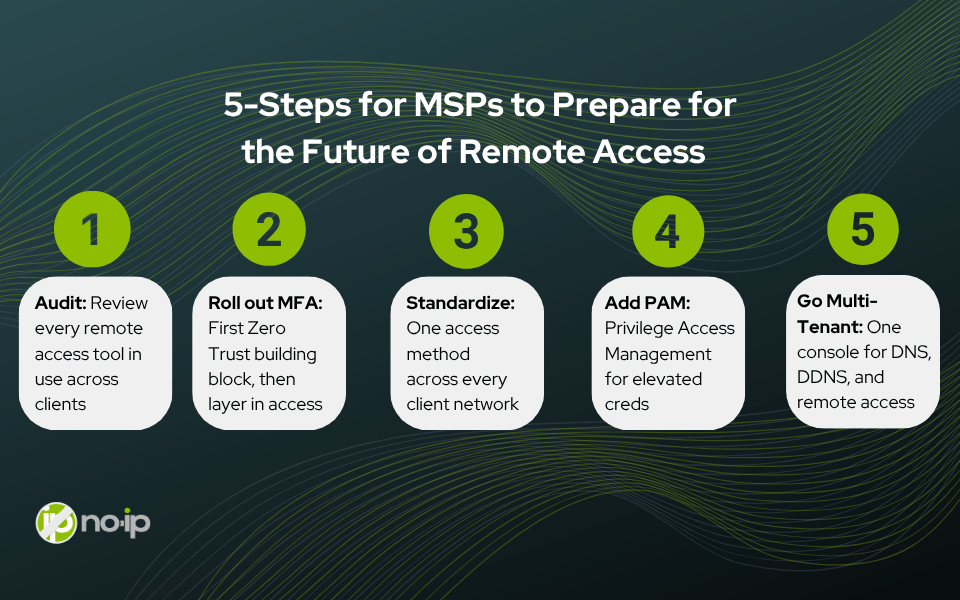
You don’t need to wait for a full platform migration to start closing the gaps above. Start here:
- Audit every remote access tool currently in use across clients and consolidate where possible.
- Roll out MFA universally as the first zero trust building block, then layer in conditional access from there.
- Standardize the remote access method across customer networks to make onboarding and support predictable.
- Add privileged access management for elevated credentials.
- Adopt a multi-tenant management console to consolidate remote access visibility.
Each of these is independent and you can start with the audit as early as this week without committing to a platform change next month.
Stay Ahead With No-IP
No-IP has run DNS infrastructure for MSPs and their clients for over 25 years, and that infrastructure is integrated into billions of devices worldwide. That history is why our approach to remote access starts with what already works in the field, not a feature list.
No-IP Public Tunnels give MSPs an outbound remote access path today, and it’s the foundation for the ZTNA capabilities coming next. the No-IP MSP Multi-Tenant Platform consolidates domain management, DNS, DDNS, and secure remote access into a single, centralized environment. Along with channel pricing built for the recurring revenue your business actually runs on, both are are investment in future network and business growth.
Remote access is going to keep evolving. The MSPs who standardize now on reverse tunnels, zero trust fundamentals, and one console instead of four, are the ones who won’t be caught rebuilding their stack when the next client network throws them a new CGNAT surprise.