TL;DR: MSPs can fix a reactive DNS outage response workflow by managing every client’s domains, DNS, and certificates from one multi-tenant dashboard. DNS change logs show who changed a record and when, one-click access to linked client accounts removes the credential hunt, and a service expiration dashboard shows every domain renewal and SSL expiry across the portfolio. The result is faster fixes, fewer expiration outages, and more technician hours on planned work. The No-IP MSP Multi-Tenant Platform is built for that workflow.
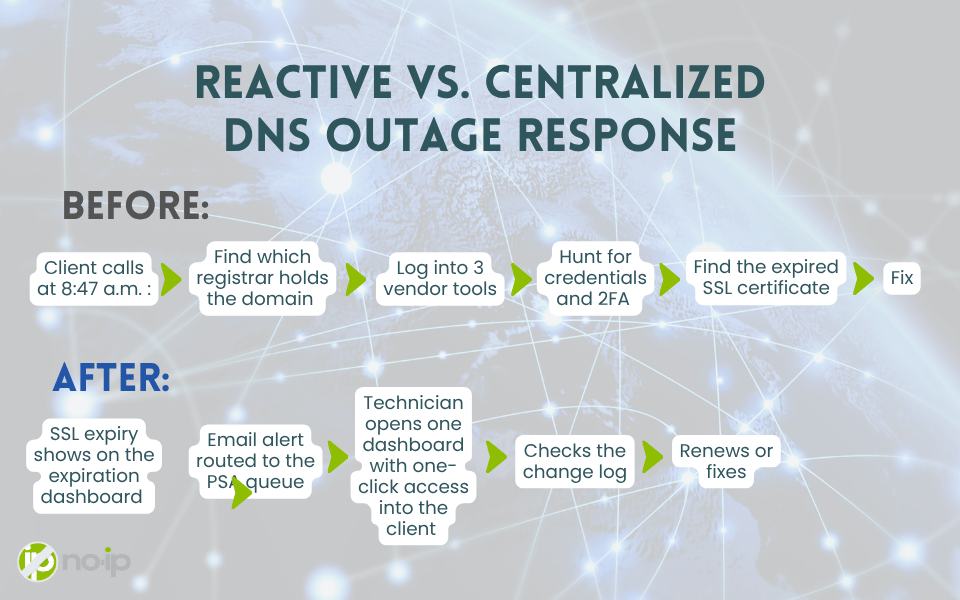
It’s 8:47 a.m., and Maya’s phone is ringing. She runs an MSP with 40 managed clients, and a retail client is on the line. Their checkout page won’t load, and customers are abandoning carts.
Maya is hearing about the outage from the person paying her to prevent it. None of her tools flagged anything, and she doesn’t yet know which registrar holds the domain, who has the login, or whether anyone touched the DNS last night.
That’s the main pain point with DNS outage response at most MSPs. Detection is reactive, and the fix is fragmented across registrars and DNS consoles the MSP doesn’t control. Here’s what changes when every client’s domain, DNS, and certificate layer sits in one pane of glass.
Why DNS Outages Turn Into Fire Drills
Issues surface via client complaint, not monitoring
Without a single view across client domains, you’re the last to know. The client notices first, then their customers, and only then does a ticket reach your queue. For most SMB clients, nobody owns the domain and DNS layer at all.
Fixing it means logging into multiple vendor tools
Once you know something’s broken, you still have to reach it. That could be a GoDaddy account the client opened in 2014, a Cloudflare zone a web agency controls, or a registrar login with 2FA sitting on the client’s phone. Delegated access gets revoked and passwords get rotated without notice. The outage often lasts longer than the diagnosis, because finding the right login takes longer than finding the bad record.
What’s usually behind the outage
The causes are rarely exceptional. Most DNS fire drills trace back to a short list:
- Expired or deleted DNS records after a site migration
- Misconfigured A, MX, or CNAME entries pushed by a third-party developer
- A missed domain renewal or SSL certificate expiration
- A registrar lockout or a compromised registrar account
- TTL misconfigurations that keep a bad record cached after you’ve fixed it
Certificates are getting harder to track, too. Renewal volume tend to keep climbing for any MSP holding a few hundred client certificates.
Before vs. After: Centralizing DNS Response
| Workflow Step | Without a Centralized Platform | With the No-IP MSP Platform |
|---|---|---|
| Detection | DNS issues and expirations are discovered after clients report problems | Every domain renewal and SSL expiry is visible in one dashboard, and change logs show who edited a record and when |
| Resolution | Fixes require logging into multiple vendor tools, delaying resolution | Fixes can be applied from one dashboard, with one-click access into each linked client |
| Team Time | Technicians spend significant time reacting to DNS fires | Technicians focus on planned work rather than emergency fixes |
Every extra hour a DNS issue stays unresolved compounds client frustration and churn risk. Clients remember the outages they heard about from their own customers first.
A centralized DNS platform gives MSPs one view of every client’s domains, DNS records, and certificate expirations, so problems don’t stay hidden until a support ticket arrives. Fixes are applied from one dashboard instead of multiple vendor logins, cutting resolution time and freeing technicians for planned work.
Want to see what this looks like across your own client base? Talk to an Expert on our team, or browse the No-IP MSP Solutions Overview to see how DNS, domains, Dynamic DNS, and remote access fit together.
What a Centralized Platform Changes in Practice
Visibility across every client
DNS change logs record every change with who made it, what changed, and when, and both you and the client can see them. When a web developer edits an A record at 11 p.m., the 8 a.m. diagnosis starts with the answer.
The service expiration dashboard shows every domain renewal and SSL expiry across your managed portfolio. Expiration and billing notifications go to the email addresses you configure. Renewals run through the platform, which puts the MSP in control of them instead of the client’s billing inbox.
Today, the change log is your audit trail.
One login, one dashboard
The No-IP MSP Multi-Tenant Platform puts every client’s domains, DNS, and connectivity services behind one login. Linked parent-child accounts keep each client’s environment separate, and one-click technician authentication gets your team into any linked client with no shared passwords or 2FA handoffs. MFA is required on the MSP platform account.
No-IP is both the ICANN-accredited registrar and the DNS host, so the finding and the fix live in the same place. Your technician opens the dashboard, checks the change log, and corrects the record in one session.
MSPs using the platform can be more cost-efficient every month in technician time and avoided truck rolls.
Built on 25+ years of DNS infrastructure, 150+ global Anycast locations, and a 100% uptime track record.
Signs Your DNS Workflow Is Reactive
First, run through this list. If more than two sound familiar, your team is firefighting by default.
- You find out a domain or certificate expired from a client phone call
- Your team needs 3+ logins to diagnose one issue
- You can’t show a client who changed a DNS record last month, or when
- Fixing one client’s DNS issue means locating credentials you don’t have on hand
- Your technicians spend more hours reacting than doing planned work
Each one points to a workflow built one client at a time, with no single control plane tying it together.
From Firefighting to Planned Work
For an MSP owner, the payoff shows up in where your technician hours go.
Every emergency DNS escalation pulls a technician off planned work. he migration you scoped last month, the security review a client already signed off on, the onboarding for the new account. Each one pushes back billable, scheduled work and makes your capacity harder to predict.
When expirations are visible in one place, change history is a click away, and fixes happen from one login instead of five, fewer issues turn into escalations. Engineers focus on planned work, not emergency fixes.
Getting started takes one change per client. You link the client’s account to yours and point their nameservers to No-IP. Clients keep their domains and can stay with their registrar, so there are no forced transfers, and offboarding is just unlinking.
FAQs
What causes most DNS outages for MSP clients? Most trace back to expired or deleted records, misconfigured A, MX, or CNAME entries, missed domain renewals or SSL expirations, registrar lockouts, and TTL settings that keep a bad record cached.
Can I see who changed a client’s DNS record? Yes. DNS change logs are live and record who made each change, what changed, and when. Real-time alerting on those changes is on the roadmap.
What notifications does the No-IP MSP Platform send? Expiration and billing notifications go to the email addresses you configure. Most MSPs route them into their PSA by email. Native PSA and RMM integrations are on the roadmap.
Do clients have to transfer their domains? No. Clients update their nameservers to point to No-IP, keep ownership of their domains, and can stay with their current registrar.
Conclusion
It’s 8:47 a.m. again, and Maya’s phone stays quiet. Her retail client’s SSL certificate is issued and tracked in the platform, so the renewal showed up on the expiration dashboard and in her team’s PSA queue before the certificate expired. A technician renewed it. The checkout page never went down.
That’s the shift away from reactive DNS management. The expirations handled before they hit, change history in one place, and fixes from one login.
See how the No-IP MSP Multi-Tenant Platform brings every client’s DNS into a single pane of glass. Get Started today, or Talk to an Expert about fixing your DNS outage response as an MSP.