TL;DR: This guide breaks down the remote access tools IT teams and MSPs use, organized by the six separate jobs they cover: ad hoc attended support, unattended access at scale, private network access, full data ownership, credential management, and multi-client oversight. TeamViewer covers one-off help-desk sessions; NinjaOne bundles unattended access into an RMM console for patching fleets of endpoints; Tailscale builds a private WireGuard mesh for a team’s own internal infrastructure; RustDesk is the self-hosted option for teams under a data-sovereignty mandate; Bitwarden manages the credentials across all of them; and No-IP’s MSP Multi-Tenant Platform consolidates every client’s DNS, domains, and remote access behind one login instead of forty separate ones. Most IT teams already run two or three of these tools and are missing the piece — usually multi-client oversight — not the piece that gets a technician onto a laptop. No-IP is running a live demo of the MSP Multi-Tenant Platform on September 16, 2026 at 12 p.m. EST.
Your help desk uses one tool to jump onto a user’s laptop. Your overnight patch job runs through another. Your own team reaches its internal servers through a third. Every technician has a password vault they may or may not actually use consistently. And every client’s DNS, domains, and access sit behind a separate login you have to remember the password to. That’s not one remote access problem. It’s five or six of them stacked on top of each other, and no single tool solves all of them at once.
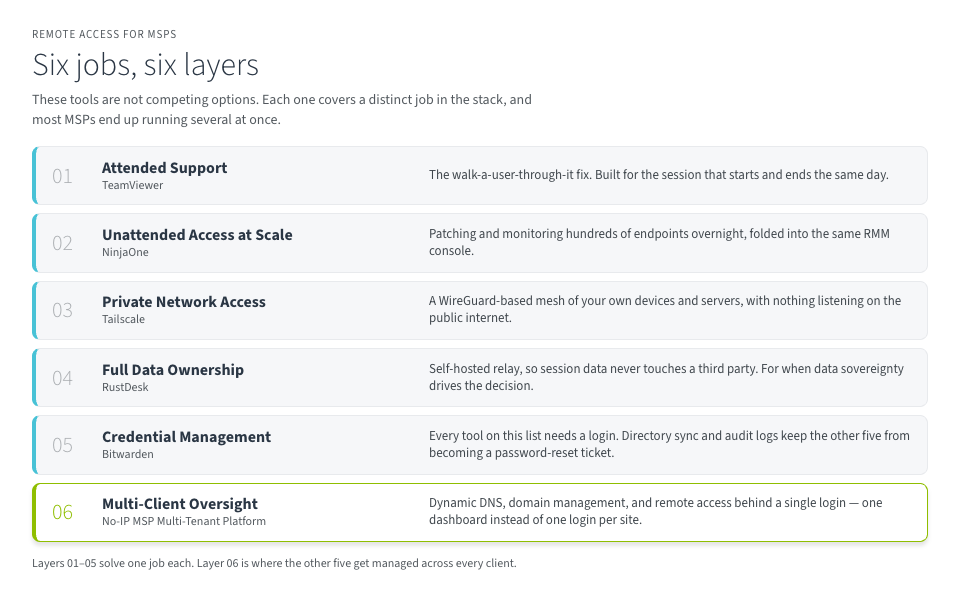
“Remote access” isn’t one job; it’s several. An ad hoc fix on a user’s laptop, unattended patching across hundreds of endpoints overnight, a technician reaching your own internal servers, session data that can’t leave your own infrastructure, the credentials that get a tech into all of it, and a single place to see every client’s DNS and domains at once. No single tool covers all six. A well-run IT team or MSP runs several of these together, not instead of each other.
Here’s what’s actually in that stack, and the job each piece is doing.
The Jobs a Remote Access Stack Has to Cover
- Ad hoc attended support. A user clicks “allow,” and a technician takes it from there. Built for the one-off help-desk ticket, not for standing infrastructure.
- Unattended access at scale. This is for when no one’s at the keyboard. This is patching and monitoring a fleet of endpoints overnight, folded into the same console that runs the rest of the fleet.
- Private network access. Your own team’s devices and servers, reachable the way a coworker’s desk is reachable, without exposing anything to the public internet.
- Full data ownership. Some compliance requirements mean session traffic can’t touch a third-party relay at all, which means running the relay yourself.
- Credential management. The logins that get a technician into all of the above, kept out of browser autofill and shared spreadsheets.
- Multi-client oversight. One dashboard for every client’s DNS, domains, and remote access, instead of one login per account.
Six Tools, Six Jobs
It’s important to note that none of the six below is a drop-in replacement for another one on this list. They sit at different points of the process. One is a screen-sharing session, another is where the passwords live, and one is No-IP’s, covering the layer where every client’s DNS, domains, and access live in one place instead of forty separate logins. Investing in all six isn’t the point, either. Most teams already run two or three of these, but may be missing the piece that consolidates client accounts, not the piece that gets a technician onto a laptop.
TeamViewer — Ad Hoc Attended Support
TeamViewer is the name most people picture for the walk-a-user-through-it fix. Users click a link, grant access, and a technician takes over. It spans five tiers, with support for up to 500 managed devices at the top end and mobile device access most compliance teams already recognize as a separate add-on. It’s built for the session that starts and ends the same day, not for infrastructure you stand up once and forget about.
NinjaOne — Unattended Access at Scale
Once the job becomes patching and monitoring hundreds of endpoints overnight instead of fixing one laptop, unattended access folded into an RMM console does more than a standalone remote tool. NinjaOne folds remote access into the same console as monitoring, patching, and alerting, with the remote session itself running on Splashtop or ScreenConnect under the hood, depending on the bundle. It earns its place when remote access is one line item among several, not the only thing a team needs, and it’s sized for a fleet of endpoints rather than a handful of laptops.
Tailscale — Private Network Access
Not every remote access need is client-facing. Tailscale builds a private WireGuard-based mesh out of your own team’s devices and servers. A technician’s laptop reaches an internal server the same way it reaches a coworker’s desk, with nothing listening on the public internet. It scales from a two-person team to a full distributed workforce without a site-to-site VPN appliance in between. See Zero Trust vs. VPN for MSPs for how this outbound-only model compares to a traditional VPN at MSP scale.
RustDesk — Full Data Ownership
RustDesk is the self-hosted option. The session data never touches a third-party relay because you’re running the relay yourself. That’s the right tool for a team with a compliance mandate against third-party session logging and the engineering hours to patch and monitor the relay themselves. There’s no support line to call when the relay goes down at 2 a.m., which is the real tradeoff for owning every hop yourself. It earns its keep specifically when data sovereignty is the requirement driving the decision.
Bitwarden — Credential Management
Every tool on this list needs a login, and a technician juggling logins for forty client accounts in a browser’s autofill is how credential sprawl starts. Bitwarden covers that gap with directory sync and audit logs at the team tier, and single sign-on at the enterprise tier for organizations that need it. It’s the piece that keeps the other five tools from turning into a password-reset ticket of their own.
No-IP MSP Multi-Tenant Platform — Multi-Client Oversight in One Dashboard
Imagine forty client logins, a registrar nobody remembers the password to, and a DNS record a third-party developer changed without telling you. The MSP Multi-Tenant Platform puts Dynamic DNS, domain management, and remote access behind a single login, so you’re managing every client’s connectivity from one dashboard instead of one login per site. It runs on 25+ years of operating DNS infrastructure and a 125+ PoP Anycast network, with a 100% uptime track record. Higher tiers add unlimited client accounts you manage under your own name, so the platform stays invisible to the client while you stay the point of contact.
| Tool | Job It Covers | Best For |
|---|---|---|
| TeamViewer | Ad hoc attended support | Help desks running occasional attended sessions |
| NinjaOne | Unattended access bundled with RMM | MSPs already standardized on an RMM console |
| Tailscale | Private network access for your own team | Teams connecting their own distributed infrastructure |
| RustDesk | Self-hosted, full data ownership | Teams under a self-hosting or data-sovereignty mandate |
| Bitwarden | Credential management across every tool | Any team juggling logins across more than a few clients |
| No-IP MSP Multi-Tenant Platform | Multi-client DNS, domain, and access oversight | MSPs managing DNS, domains, and access across many clients |
See It Live — Free Webinar, September 16
No single tool on this list replaces one over the other. TeamViewer doesn’t patch a fleet overnight, Tailscale doesn’t give you a single dashboard across forty client accounts, and neither one manages the credentials your technicians use to get into everything else. That’s not a gap in any one product. It’s six different jobs, and a working IT team or MSP runs the tools that cover the jobs it actually has.
No-IP is running a live demo of the MSP Multi-Tenant Platform on September 16, 2026 at 12 p.m. EST. One dashboard for every client’s DNS, domains, and remote access, replacing the separate logins and spreadsheets most MSPs are still running client access through. The team is taking questions afterward, so bring the client scenario that’s been sitting in your ticket queue.
FAQs
Why does an IT team or MSP need six different remote access tools instead of one?
Because “remote access” isn’t one job. Ad hoc attended support, unattended patching at scale, private network access, self-hosted data ownership, credential management, and multi-client oversight each solve a different problem, and no single vendor covers all six today.
Do we need all six tools listed here?
No. Most teams already run two or three of these and are missing one specific piece, usually the layer that consolidates client accounts, not the layer that gets a technician onto a laptop. Match the tool to the job you actually have.
What’s the difference between TeamViewer and NinjaOne?
TeamViewer is built for attended, one-off sessions: a user clicks “allow” and a technician takes over. NinjaOne is for unattended access at scale, folded into an RMM console alongside patching and monitoring for a fleet of endpoints, with the remote session running on Splashtop or ScreenConnect underneath.
Is Tailscale a replacement for a VPN?
Tailscale builds a private WireGuard-based mesh for your own team’s devices and servers, not client-facing sessions. It’s an outbound-only, zero-trust model rather than a traditional site-to-site VPN appliance. See Zero Trust vs. VPN for MSPs for how the two compare at MSP scale.
Why would a team self-host remote access with RustDesk instead of using a hosted tool?
Compliance. RustDesk keeps session data off any third-party relay because you run the relay yourself. That’s the right call when data sovereignty is a mandate, not a preference, and your team has the engineering hours to patch and monitor that relay, including at 2 a.m. when there’s no support line to call.
How does credential management fit into a remote access stack?
Every tool on this list needs a login, and a technician managing forty client accounts in browser autofill is how credential sprawl starts. Bitwarden centralizes those logins with directory sync, audit logs, and SSO, so the other five tools don’t turn into a password-reset problem of their own.
What does the No-IP MSP Multi-Tenant Platform cover that the other five tools don’t?
The layer before a session even starts: forty client logins, a registrar nobody remembers the password to, a DNS record a third-party developer changed without telling you. It puts DNS, Dynamic DNS, domain management, and remote access behind one login, so you manage every client’s connectivity from a single dashboard instead of one login per site.
Where can I see the MSP Multi-Tenant Platform in action?
No-IP is running a live demo on September 16, 2026 at 12 p.m. EST, covering one dashboard for every client’s DNS, domains, and remote access. Register for the webinar.