Last updated September 18th, 2026
TL;DR: No-IP offers two distinct product lines built on the same Anycast DNS network (125+ PoPs, ranked #1 for uptime by DNSPerf as of November 2024). Dynamic DNS (DDNS) keeps a hostname pointed at a device or network whose IP address changes — used for remote access to home NAS setups, security cameras, and small business networks. Plans range from Free (1 hostname) to Enhanced (3 hostnames, SSL, Public Tunnels) to Pro (50 hostnames, 5 SSL certs, Public Tunnels for port-free remote access). Managed DNS solves a different problem: reliable DNS hosting for a domain’s website, email, and apps, with tiers from Plus (500K queries/month) to Premium (1M queries, DNSSEC, SLA-backed uptime) to Squared Backup DNS (secondary DNS redundancy if a primary provider fails). Use DDNS if your IP changes; use Managed DNS if your domain’s DNS reliability matters; many setups use both together.
Being able to stay connected is something that everyone takes for granted. You may not notice any issues with your home NAS or your clients’ security cameras until you find you can’t access them. Or your DNS provider crashes and every domain that depends on it goes down too.
Luckily, No-IP runs two different product lines to solve them: Dynamic DNS (DDNS) for networks whose IP address changes, and Managed DNS for anyone who needs their DNS to be the reliable part of the stack. Take a look at what DDNS and Managed DNS services No-IP has to offer.
Dynamic DNS: For When Your IP Address Doesn’t Sit Still
Dynamic DNS solves one specific problem: Your ISP assigns an IP address that can change without warning, and you need a hostname that keeps pointing at your network anyway. A small Dynamic Update Client (DUC) runs on your network, detects the change, and updates the DNS record usually before you’d notice the drop yourself.
Your internet connection hands out a dynamic IP address, one that can change any time your ISP feels like it, which turns remote access into chasing a moving target. Dynamic DNS fixes that by pointing a hostname you pick at your current IP address and automatically keeps that pointer current so the hostname behaves like a static IP even though the address behind it isn’t.
The setup is a two-step process: Create an easy-to-remember hostname, then if your device doesn’t already have a No-IP integration, install our Dynamic Update Client (DUC) on the device you want to reach. Once the process is complete, every time your IP address changes, it catches the change and updates your hostname within minutes. The result: your hostname always resolves to your current IP address, so you can remote into your device whenever you need to, without tracking down a new address first.
Free Dynamic DNS covers your basic needs. One hostname, one update client, a choice of 30 No-IP-owned domains, and access to the same Anycast DNS network as the paid tiers.
Enhanced Dynamic DNS allows you to get:
- three hostnames
- three update clients
- a choice of 80-plus domains or your own domain
- one Vital Encrypt DV SSL certificate
- phone and web support
- access to No-IP’s 125+-PoP network with no ads on redirects.
Pro Dynamic DNS is a great fit for someone running more than a handful of devices:
- 50 hostnames
- 50 update clients
- five SSL certificates
- one DNS zone
- the same phone and web support as Enhanced.
This is the tier that fits a home lab running a dozen services, or a small IT shop managing several client sites from one account.
Pro also carries No-IP’s Public Tunnels. Public Tunnels give you secure remote access to a device or network without opening a port or touching a router configuration. The connection runs outbound from your side, so nothing sits there listening for the internet to find it. For a security camera, a NAS, or an internal admin panel you need to reach remotely, that’s one less firewall rule to maintain and one less thing to explain during a security review.
Managed DNS: For When DNS Itself Can’t Be the Weak Link
Managed DNS is a different job. It’s not about a changing IP. Instead, Managed DNS’ purpose is about making sure the DNS layer underneath your domain doesn’t become the reason your site, email, or app is ever unreachable.
Plus Managed DNS covers:
- 500,000 DNS queries a month
- unlimited DNS records
- five DDNS update clients
- one included DV SSL certificate
- standard web support with Monday-through-Friday phone coverage.
Premium Managed DNS doubles the query allowance to 1 million a month and adds DNSSEC readiness, along with:
- one Team Login seat
- RESTful API access, an SLA-backed uptime guarantee
- priority support with weekend phone coverage.
This is the tier built for a business that can’t afford a DNS outage to be someone else’s problem to notice first.
Squared Backup DNS is the narrowest and often most overlooked piece. Secondary DNS redundancy with unlimited queries and hostnames and instant zone transfer. If your primary DNS provider goes down, Squared Backup keeps answering queries so your domain stays resolvable — a specific, checkable form of redundancy, not a vague promise of uptime.
It’s important to note that every Managed DNS tier supports the full range of DNS record types you’d expect to manage a real domain: A, AAAA, CNAME, MX, TXT, PTR, CAA, SRV, NS, URL, SPF, DMARC, and DKIM among others.
The Infrastructure Behind Both Product Lines
Both Dynamic DNS and Managed DNS run on the same backbone: an Anycast DNS network with 125+ PoPs and a 100% uptime track record. DNSPerf ranked No-IP number one worldwide for uptime as of November 2024. Built-in DDoS mitigation and Anycast’s one-to-many routing mean a query gets answered by the nearest available PoP, not a single server that becomes a single point of failure.
That infrastructure is the reason the “DDNS vs. Managed DNS” question isn’t really an either-or. A DDNS hostname pointed at a changing IP still depends on the DNS network resolving it quickly and reliably — which is exactly what Managed DNS is built to guarantee. The two products solve different problems on the same foundation.
Which One Do You Actually Need
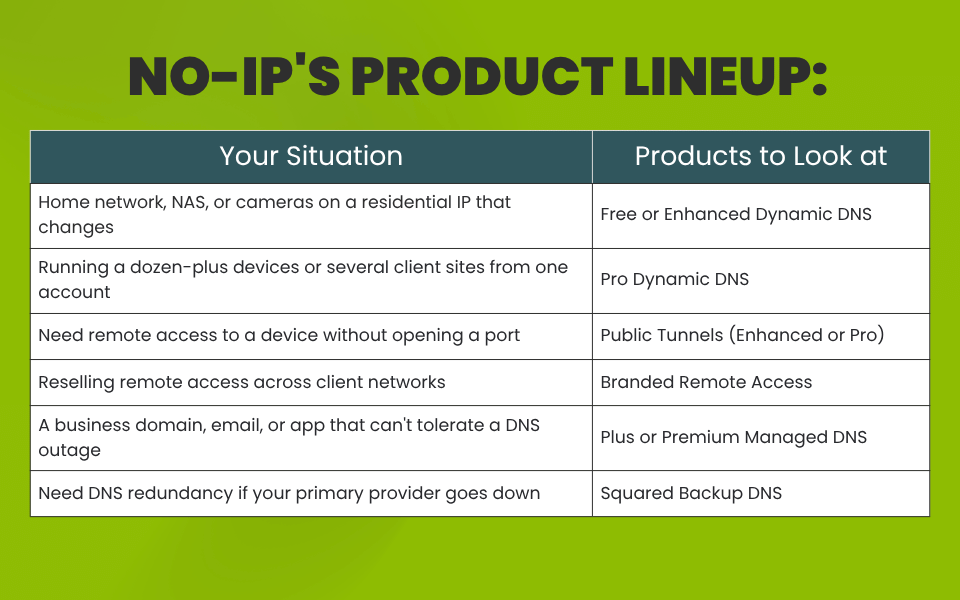
If you’re running a static website with a domain that never has to think about an IP change, Managed DNS alone covers it. If your network’s IP changes and you need a hostname that keeps up, that’s Dynamic DNS. Plenty of setups need both — a DDNS hostname for a device that moves, sitting on a Managed DNS zone that keeps resolving no matter what happens upstream. The name doesn’t matter here — it’s just the means to the connection.
FAQs
Do I need both Dynamic DNS and Managed DNS? Not always. DDNS solves a changing IP address. Managed DNS solves DNS reliability and record management for a domain. Use one, the other, or both, depending on whether your IP changes and how much your DNS uptime matters to your business.
What’s the difference between the Enhanced and Pro Dynamic DNS plans? Enhanced covers three hostnames and update clients for $2.99/month. Pro scales to 50 of each for $14.99/month, plus five SSL certificates and one DNS zone — built for managing more devices or more client sites from a single account.
Is Public Tunnels available on the free Dynamic DNS plan? No. Public Tunnels, currently in beta, is included with Enhanced and Pro Dynamic DNS subscriptions.
What does Squared Backup DNS actually protect against? It gives your domain a secondary DNS provider, so if your primary DNS goes down, Squared Backup keeps answering queries and your domain stays resolvable.
Does No-IP’s network affect performance? No-IP runs an Anycast network with 125+ PoPs, so queries resolve from the nearest point of presence rather than a single distant server — the update mechanism runs in the background and doesn’t add latency to your connection.
Start free with a No-IP account and see which product actually fits your network.