TL;DR
MSP client onboarding usually starts with collecting the client’s registrar and DNS logins and storing them in a spreadsheet. That process is hard to secure, slow to manage, and risky when a client or technician leaves. With the No-IP MSP Multi-Tenant Platform, the MSP creates the client account in No-IP (or transfers it there), links it under the MSP parent account, and authenticates into it with one click. No client passwords are shared, every client is managed from one dashboard, clients keep ownership of their domains, and offboarding is just unlinking the account.
Maya just signed client number 41. Her MSP already manages 40 clients, and she knows how MSP client onboarding goes from here. She emails the client for their registrar login, their DNS console password, and whoever holds the two-step verification codes. Then, she pastes everything into a spreadsheet and checks what the registrar will let her team change without the client’s sign-off.
It’s the same process that turned her last DNS outage into a scramble for logins, the one we covered in our post on fixing a reactive DNS outage workflow.
But the problem isn’t the new client. It’s an onboarding process built on collecting credentials. Here’s what changes when every client sits under one parent account and access takes one click.
Why MSP Client Onboarding Breaks Down at Scale
Collecting logins works at five clients. At 40, it’s a liability that your team has to painstakingly maintain by hand.
Credentials end up in spreadsheets
Every new client adds another set of logins. That means a registrar, a DNS host, sometimes a website builder that also controls the domain. Those credentials land in a spreadsheet or a shared vault entry. From there, they become hard to secure, keep current, and audit. When a client changes a password without telling you, you end up having to find out mid-ticket.
Manual logins and registrar limits slow management
Monitoring a client means signing in to each of their tools, one at a time. If the registrar sends a verification code to the client’s phone, your technician has to wait to receive it. Some registrars also restrict what a delegated user can change, so a simple nameserver update can turn into a call asking the client to make it themselves.
Shared credentials create offboarding risk
Shared logins can make exits complicated. For example, when a client relationship ends, you have to hand back access you never formally had and hope nobody kept a copy. Or when a technician leaves your team, every password they saw is a password that should be rotated out. MSP client offboarding shouldn’t depend on remembering who saw which login.
Before vs. After: Centralizing MSP Client Onboarding
| Workflow Step | Without a Centralized Platform | With the No-IP MSP Platform |
|---|---|---|
| Account setup | Client shares their existing set of tools | Client account created in, or transferred to, No-IP |
| Access | MSP requests credentials for each tool and stores them in a spreadsheet | MSP access authenticated with one click, without credential sharing |
| Ongoing management | MSP logs in and monitors accounts manually while working around registrar limitations | Client account structured under the MSP parent account for centralized management |
MSPs can onboard clients without collecting credentials by creating the client account in No-IP (or transferring it there), authenticating access with one click, and structuring each client under the MSP parent account. Spreadsheets of shared logins and manual checks give way to centralized, automated monitoring.
Want to see this with your own client list? Talk to an Expert, or browse the No-IP Solutions Overview to see how DNS, domains, Dynamic DNS, and remote access fit together.
What Multi-Tenant DNS Management Looks Like After Onboarding
Onboarding is where the credential problem starts, but it’s also where you can end it. Once a client is linked, multi-tenant DNS management replaces the per-client login routine.
One-click access, no credential sharing
The MSP multi-tenant platform authenticates your technicians into a linked client account with one click. There’s no client password to request, store, or rotate, or waiting on someone else’s two-step verification code. MFA is required on the MSP platform account itself, which means access is protected at the parent level where your team actually signs in.
That changes MSP credential management from a spreadsheet you maintain to a set of linked accounts you control. When a technician leaves, you remove their access to your account, and client passwords never pass through their hands.
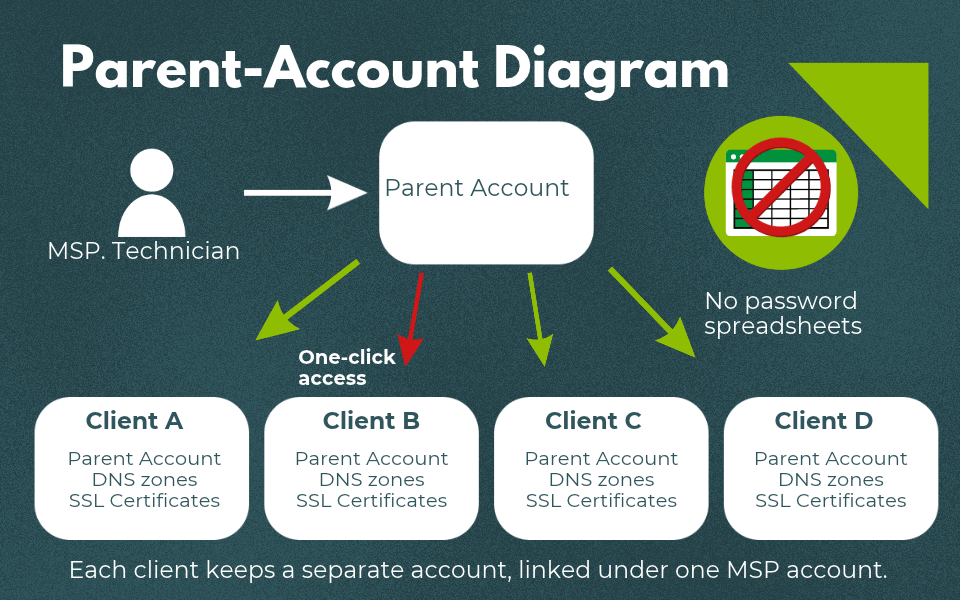
Every client under one parent account
The parent-child structure is what makes centralized management possible. Each client keeps their own account, separate from every other client’s, and each one sits under your MSP parent account. From one dashboard, your team sees every client’s zones, record history, and domain and SSL expiration dates.
This is what multi-tenant DNS management means in practice: One login for your team, a separate environment for each client, and no switching between consoles to answer a simple question. DNS change logs show who changed a record and when, so a third-party developer’s late-night edit shows up in the history instead of a mystery outage.
Clients keep ownership of their domains. When a relationship ends, offboarding disconnects the account, with no need to hand credentials back. That seamless exit is part of the multi-tenant DNS management model, and it’s worth explaining to clients during the sales conversation as it shows them they aren’t locked in.
Is Your Onboarding Workflow Holding You Back?
Run through this list. If two or more sound familiar, your MSP onboarding workflow is built on credential collection.
- You store client logins in a spreadsheet or a shared vault entry
- You ask clients for credentials every time you add a tool
- You’re unsure who still has access to a former client’s accounts
- Registrar limits stop your team from making changes without the client
- A technician leaving your team means a round of password rotations
Inheriting a Messy Setup
Many clients arrive with a domain at one registrar, DNS at another, and a login nobody can find. Moving existing clients takes an initial step, but it happens once. After that, every change runs through the same parent account as the rest of your portfolio. Talk to an Expert to map out what that first step looks like for your current clients.
If you’re weighing a newer MSP platform against tools your team already trusts, look at what sits underneath it. The MSP features are new, but the infrastructure isn’t. No-IP has run DNS for more than 25 years, and the platform runs on that same network and the same ICANN-accredited registrar. The MSP-specific features came from direct feedback from MSPs, and we’re open about what’s still on the roadmap, including role-based access control and DMARC monitoring. Talk to an Expert to map out what that first step looks like for your current clients.
Conclusion
Back to client number 41. This time, Maya doesn’t send a single password request. Her team creates the client’s account in No-IP, links it to her MSP parent account, and authenticates in with one click. The new client shows up in her parent dashboard the same day, next to the other 40.
That’s the shift: onboarding stops being a credential collection exercise and becomes linking an account to the one you already manage.
See how the No-IP MSP Multi-Tenant Platform handles every client from one parent account. Get Started today, or Talk to an Expert about simplifying MSP client onboarding.
FAQs
How can MSPs onboard clients without collecting credentials? Create the client’s account in No-IP (or transfer it there), link it under the MSP parent account, and authenticate into it with one click. Your technicians get access without the client sharing a password or two-step verification code.
What is a parent-child account structure for MSPs? It’s a setup where each client has its own separate account, and every client account is linked under one MSP parent account. The MSP manages all clients from one login while each client’s environment stays separate.
What is multi-tenant DNS management? Multi-tenant DNS management lets an MSP manage DNS for many clients from one platform and one login, with each client’s zones kept in a separate account. It replaces signing in to a different DNS console for every client.
Do clients keep ownership of their domains on the No-IP MSP Platform? Yes. Clients keep ownership of their domains. The MSP manages the account through the parent-child link.
How does client offboarding work without shared credentials? When a client relationship ends, you unlink the client’s account from your parent account. There are no shared passwords to hand back or rotate.
Is the MSP platform account protected with MFA? Yes. MFA is required on the MSP platform account, so access to every linked client is protected at the parent level.