TL;DR
A “reverse DNS does not match SMTP banner” error means the hostname a mail server announces in its SMTP banner and EHLO/HELO command doesn’t match the hostname returned by a reverse DNS (PTR) lookup on the server’s sending IP address. Receiving mail servers treat the mismatch as a spam signal.
- What causes a reverse DNS mismatch: A generic PTR record set by the ISP, hosting provider, or cloud platform (for example, ec2-xx-xx.compute.amazonaws.com), a server migration that changed one record but not the other, or an EHLO hostname such as mail.local that has no public DNS record.
- Why a reverse DNS mismatch matters: Gmail, Outlook, Yahoo, Microsoft 365, Proofpoint, and Mimecast check forward-confirmed reverse DNS (FCrDNS). Since February 2024, Google and Yahoo require valid forward and reverse DNS for all senders, so a mismatch can cause 550 rejections or spam-foldering.
- How to check reverse DNS: Run dig -x <IP> on Linux or macOS, or nslookup <IP> on Windows, to see the PTR record. Compare it to the mail server hostname (myhostname in Postfix, primary_hostname in Exim, or the Send Connector FQDN in Exchange).
- How to fix the SMTP banner mismatch: Ask the IP owner to set the PTR record to your mail hostname, or set the mail server hostname to match the existing PTR exactly, subdomain included.
- How to verify the fix: dig -x <IP> returns the mail hostname, and dig <hostname> returns the same IP. Matching results in both directions confirm FCrDNS.
- Does a reverse DNS mismatch fail DMARC: No. DMARC evaluates only SPF and DKIM alignment with the From domain. The mismatch often appears alongside the SPF or DKIM errors that do fail DMARC, so audit SPF, DKIM, and DMARC together.
- How to keep reverse DNS from drifting: Manage forward DNS and PTR records in one place, delegate reverse DNS zones you own, and automate record changes through a DNS API so migrations and new sending IPs don’t reintroduce the mismatch.
Your invoices aren’t landing. The rejection log shows a 550 from a Microsoft 365 tenant, a deliverability audit flags a warning on your sending IP, and MXToolbox spells it out in red: Reverse DNS does not match SMTP banner. One line of config, and your outbound mail is now a reputation problem.
The error means the hostname your mail server announces doesn’t match the hostname its IP address resolves to in reverse DNS. Below, we cover what causes it, what it does (and doesn’t do) to DMARC, and how to fix it.
Fixing it once is the easy part. Keeping it fixed across every sending IP, migration, and new host is the real B2B problem. A mismatch that used to cost a few spam-score points now risks outright rejection.
If PTR records are new territory, read how PTR records and reverse DNS lookup work first. If you’re hosting your own mail server on a business connection, this guide is written for you.
Quick answer: A “reverse DNS does not match SMTP banner” error occurs when the hostname your mail server announces in its EHLO/HELO command doesn’t match the domain returned by a reverse DNS (PTR) lookup on its IP address. To fix it: (1) find the PTR record on your sending IP, (2) set your SMTP banner hostname to match it exactly, (3) confirm with a reverse DNS lookup. Mismatches trigger email rejection and spam filtering, and often signal the broader misconfiguration behind SPF, DKIM, and DMARC failures.
What This Error Actually Means
The SMTP handshake: where the mismatch happens
Every SMTP session opens with a short exchange before any mail moves. The receiving server runs its reverse DNS check during that exchange.
| Step | What happens | Example |
|---|---|---|
| 1 | Your server connects to the recipient’s MX on port 25 | 203.0.113.25 → mx.recipient.com |
| 2 | The receiving server sends its 220 banner | 220 mx.recipient.com ESMTP |
| 3 | Your server sends EHLO with its hostname | EHLO mail.company.com |
| 4 | The receiver runs a PTR lookup on your connecting IP | 203.0.113.25 → server42.hostprovider.net |
| 5 | The receiver compares the two names | mail.company.com ≠ server42.hostprovider.net |
Step 5 is the failure. Your server says it’s mail.company.com, but the IP owner’s DNS says that address belongs to server42.hostprovider.net. To a spam filter, that looks like a box that doesn’t know who it is.
Testing tools like MXToolbox connect to your server and read your 220 banner, which is why the warning reads “SMTP banner.” On most servers the banner and the outbound EHLO name come from the same hostname setting, so fixing one fixes both.
Forward-confirmed reverse DNS (FCrDNS): the check you’re failing
Forward-confirmed reverse DNS means the two directions agree. The PTR on your IP points to a hostname, and that hostname’s A record points back to the same IP.
RFC 5321 requires a fully qualified domain name (FQDN) in the EHLO command. It doesn’t require that name to match your PTR. The EHLO-to-PTR match is a receiver-side anti-spam convention, but it’s one nearly every major receiver enforces.
Gmail, Outlook, and Yahoo all check FCrDNS. So do the enterprise gateways most B2B recipients sit behind: Microsoft 365, Proofpoint, and Mimecast. If you send to other businesses, your mail goes through exactly the filters that care most.
Why It Matters for B2B and What It Means for DMARC
Deliverability impact
PTR and EHLO consistency is one of the cheapest checks a receiver can run, so almost all of them run it. A mismatch hits you three ways:
- Adds points in SpamAssassin-style scoring systems, pushing borderline messages over the spam threshold
- Triggers 550 hard rejections at receivers that enforce FCrDNS strictly
- Drags down the sending IP’s reputation over time, which affects every message from that address
Transactional mail takes the same hit as outbound sales email. Invoices, contract notices, password resets, and monitoring alerts all leave from the same IP. When the PTR is wrong, the receiver doesn’t care which kind of message it is.
The DMARC connection: a red flag, not a cause
Be precise here, because a lot of advice online gets this wrong. A PTR/EHLO mismatch does not cause DMARC to fail. Per dmarc.org, DMARC evaluates only whether SPF and/or DKIM pass and align with the From domain. It has no visibility into the SMTP banner, the EHLO hostname, or the PTR record.
What is true: the mismatch is usually a symptom. A server with a generic PTR and an internal EHLO name was probably set up in a hurry. That same server often has a sending IP missing from the SPF record or a DKIM key that was never published, and those are what actually fail DMARC.
If your DMARC aggregate reports show failures and your PTR/EHLO is also mismatched, treat the mismatch as a prompt to audit SPF, DKIM, and DMARC together. Don’t expect the PTR fix alone to move your DMARC pass rate.
Separately, receivers use PTR and FCrDNS as an independent reputation signal. A message can pass DMARC cleanly and still get rejected or spam-foldered because the PTR is wrong. Two different checks, two different ways to lose the message.
Common Causes of the Mismatch
| Cause | What happened |
|---|---|
| PTR set by ISP/host, never updated | The provider assigned a generic PTR (e.g. server42.dc.net). You set your own hostname but never requested a PTR update. |
| Banner changed post-migration | The server migrated or rebranded. The SMTP banner was updated but the PTR wasn’t, or the reverse. |
| Multiple IPs, wrong PTR on sending IP | The PTR is correct on one IP, but mail leaves from a different IP with no matching PTR. |
| VPS/cloud default rDNS | AWS, GCP, and Azure assign default PTRs (e.g. ec2-xx-xx.compute.amazonaws.com) that never match your mail hostname unless you change them. |
| EHLO uses an internal hostname | Postfix, Exim, or Exchange is configured with an internal name (mail.local) that has no public DNS record. |
The multiple-IP case is the one that wastes the most time. You check the PTR on the IP you think sends mail, it looks right, and the problem is a secondary address on the same NIC. Check the Received: header on a bounced message to confirm the actual sending IP.
How to Diagnose It
Step 1: Check the PTR record with dig or nslookup
Run a reverse DNS lookup on your sending IP. On Linux or macOS, the reverse DNS lookup command is dig -x:
dig -x 203.0.113.25 +shortOn Windows, use the nslookup reverse DNS lookup from cmd:
nslookup 203.0.113.25A generic hostname, a cloud default, or no result at all means the PTR is the problem. Our dig command guide covers the other flags worth knowing. No shell access? The MXToolbox reverse DNS lookup returns the same answer in a browser.
Step 2: Check the SMTP banner and EHLO hostname
Find the hostname your mail server announces:
- Postfix: postconf myhostname (or grep myhostname /etc/postfix/main.cf)
- Exim: exim -bP primary_hostname
- Exchange: Get-SendConnector | Select Name, Fqdn
For Exchange, the Send Connector FQDN sets the EHLO name on outbound mail, which is the rejection scenario here. The Receive Connector FQDN controls the inbound 220 banner that testing tools read. Set both to the same name.
The value must match the PTR exactly, subdomain included. company.com does not match mail.company.com.
Step 3: Verify FCrDNS in both directions
Run the lookup forward and back:
dig mail.company.com +short     # should return 203.0.113.25
dig -x 203.0.113.25 +short      # should return mail.company.com.
Both answers must agree. If the PTR is right but the A record points somewhere else, you’ve only fixed half of FCrDNS. For readers working without shell access, our round-up of DNS tools covers browser-based options.
How to Fix It Step by Step
You have two paths: change the PTR to match your hostname, or change your hostname to match the PTR. Option 1 is almost always the right call, because mail.company.com builds reputation for your domain and server42.hostprovider.net doesn’t.
Fix 1: Update the PTR record
PTR records live in the reverse zone controlled by whoever owns the IP block. That’s your ISP, hosting provider, or cloud platform, not your registrar or DNS host. You also need a static IP, since a PTR on a dynamic address won’t stay put.
- Create an A record for your mail hostname (mail.company.com) pointing to the sending IP
- Request a PTR update from the IP owner, pointing the IP to that hostname
- On AWS, open the Elastic IP, choose Actions → Update reverse DNS, and enter the hostname (AWS checks that the A record already resolves to the IP)
- Allow 24–48 hours for propagation, then re-check with dig -x
Fix 2: Align the SMTP banner to the existing PTR
If you can’t change the PTR, or it already points to a name you control, set your mail server’s hostname to match it.
- Postfix: set myhostname = mail.company.com in main.cf, then postfix reload
- Exim: set primary_hostname = mail.company.com, then restart Exim
- Exchange: Set-SendConnector -Identity “Outbound” -Fqdn mail.company.com, plus the matching Receive Connector
Then confirm what the server presents:
telnet 203.0.113.25 25Read the 220 line. It shows the banner the server presents on connection, which matches the outbound EHLO as long as both derive from the same hostname setting.
Verify the Fix Worked
Once propagation finishes, run through this checklist:
- Confirm dig -x <IP> returns your mail hostname
- Confirm dig <hostname> returns the same IP (FCrDNS confirmed)
- Send a test message to mail-tester.com and review the rDNS/PTR section of the report
- Run the MXToolbox SMTP test and Blacklist check on the sending IP
- Re-check your DMARC aggregate reports after 24 hours
On that last step, set expectations. Your DMARC pass rate improves only if SPF and DKIM were also corrected. The PTR fix shows up in fewer rejections and better inbox placement, not in your DMARC numbers.
Managing Reverse DNS Across B2B Infrastructure
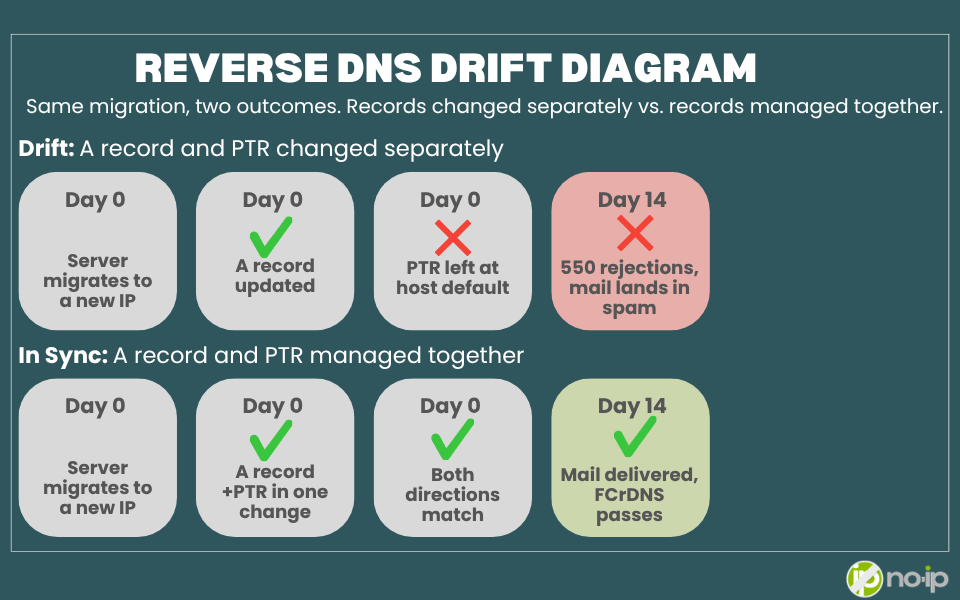
A single mismatch takes an afternoon to fix. The harder problem is that it comes back. Look at the causes table again: almost every row is drift. An IP changes, a server migrates, someone adds a new outbound relay, and the A record and PTR fall out of step. For a team running 10 sending IPs across two providers and three zones, that isn’t a one-time error. It’s a recurring fire drill.
Teams that stop seeing this error usually manage reverse DNS the same way they manage forward DNS. Three practices make the difference.
Centralized DNS and PTR management
The drift happens because forward and reverse records live in different places. The A record sits with your DNS host, the PTR sits in an ISP ticket queue or a cloud console, and nobody owns both. Keep them in one place, or at minimum one inventory, and every change to a mail hostname becomes a change to both records.
A practical baseline:
- List every IP that sends mail, including relays, transactional services you self-host, and backup MX hosts
- Record the expected PTR and A record for each one side by side
- Make a PTR check part of every server migration and IP change, not a cleanup task after the bounces start
Reverse DNS zone management
If your organization owns its IP space or leases a block from an ISP, you may not need to file a ticket for every PTR change. Many providers will delegate the reverse zone (the in-addr.arpa zone for your block) to name servers you choose. For a /24 or larger, that’s a standard NS delegation. For smaller blocks, providers use classless delegation per RFC 2317, which points CNAMEs in their zone at a subzone you control.
Once the reverse zone is delegated, PTR records become ordinary records in a zone you manage. You edit them alongside your forward zones, with the same change log and the same people. Ask your ISP or IP provider whether they support reverse delegation before your next migration, not during it.
API access for programmatic record control
At DevOps scale, a dashboard isn’t enough. If your infrastructure-as-code pipeline creates a new sending host, it should create the A record and request or write the PTR in the same run. Teams that script both directions don’t get post-migration drift, because nothing changes by hand.
The same API makes the check repeatable. A scheduled job that runs forward and reverse lookups on every sending IP and alerts on a mismatch catches drift before a receiver does.
Where No-IP Managed DNS fits
That’s the model we’re building No-IP Managed DNS around: forward DNS, PTR records, and reverse zones managed from one dashboard instead of three consoles. The No-IP API gives teams programmatic control over DNS records today, so record changes can live in your scripts rather than someone’s memory.
Underneath it all is a 150+ PoP Anycast network, ranked #1 worldwide for uptime by DNSPerf, and independent of any major cloud. When Google or Cloudflare has a bad day, your mail server’s DNS keeps answering.
A Note on the Google Workspace Version of This Error
If you search “reverse dns does not match smtp banner google workspace,” you’re probably seeing the warning on an MXToolbox test of Google’s MX hosts. Google’s servers present banners that don’t always match their PTRs exactly, and MXToolbox flags it.
You can ignore this one. Google owns those IPs and that configuration, and receivers don’t penalize Google’s mail for it. The fix in this guide applies only to servers whose IPs you control.
Fix the Mismatch, Then Manage It
This error looks cryptic in a bounce log, but it’s a fixable misconfiguration, not a black box. Identify the PTR, align the SMTP banner, verify FCrDNS, and confirm with a test send.
For B2B teams running their own mail infrastructure, the fix is the start, not the finish. Every new sending IP, migration, and provider change is another chance for the A record and the PTR to drift apart. A rejected invoice or a spam-foldered contract is lost revenue that never shows up as an error in your CRM.
So treat reverse DNS as part of DNS management, not as a ticket you file once. Keep forward and reverse records in one inventory, delegate reverse zones where your provider allows it, and put record changes in code so they happen with every deploy. If you’re mapping out how to do that across your infrastructure, see how No-IP Managed DNS and the No-IP API approach forward and reverse DNS together.
Then keep going. The mismatch is the prompt to look at SPF, DKIM, and DMARC, not the DMARC fix itself.
Reverse DNS and SMTP Banner FAQs
What does “reverse DNS does not match SMTP banner” mean? The hostname your mail server announces in its SMTP banner or EHLO command differs from the hostname returned by a reverse DNS (PTR) lookup on its IP address. Receiving servers and testing tools like MXToolbox flag the difference as a sign of a misconfigured or untrustworthy sender.
How do I fix a reverse DNS mismatch on my mail server? Either ask the owner of your IP (ISP, host, or cloud provider) to set the PTR record to your mail hostname, or change your mail server’s hostname to match the existing PTR. Make sure the hostname’s A record also points back to the same IP, then verify with dig -x <IP>.
Does a reverse DNS mismatch cause DMARC to fail? No. DMARC checks only whether SPF and/or DKIM pass and align with the From domain. A PTR mismatch is a separate reputation signal, but it often appears alongside the SPF or DKIM errors that do fail DMARC.
How do I check reverse DNS from the command line? Use dig -x <IP> on Linux or macOS, or nslookup <IP> from cmd or PowerShell on Windows. Either returns the PTR record for that address, or nothing if no PTR exists.
Who controls my PTR record? The organization that owns your IP address block, usually your ISP, hosting provider, or cloud platform. Your domain registrar and forward DNS host can’t change it unless they also own the IP.
How long does a PTR record change take to propagate? Usually a few minutes to a few hours, but allow 24–48 hours depending on the provider and the record’s TTL. Re-check with dig -x before you rule the change out.
How do I keep reverse DNS from drifting across multiple servers? Track every sending IP with its expected PTR and A record in one place, and update both as part of any migration or IP change. At scale, script record changes through a DNS API and run a scheduled forward-and-reverse lookup check that alerts on mismatches.
Can I manage my own reverse DNS zone? Often, yes, if you own or lease your IP block. Ask your provider to delegate the in-addr.arpa zone to your name servers (or use RFC 2317 classless delegation for blocks smaller than a /24). You then edit PTR records like any other DNS record.
Can I set reverse DNS on a dynamic IP? Not reliably. PTR records belong to a specific IP, and a dynamic address can change at any time, taking your PTR with it. Mail servers that send directly to the internet need a static IP with a PTR you control.