Everything tied to the internet relies on DNS infrastructure. Unfortunately, security is not guaranteed. Domain Name System Security Extensions (DNSSEC) address a fundamental weakness in DNS, one that dates back to its original design in the 1980s, when security was not yet a priority. Traditional DNS provides no built-in mechanism to verify the authenticity of responses, making it possible for attackers to redirect users through spoofed or corrupted records. DNSSEC closes this gap by adding cryptographic validation, ensuring DNS data can be trusted before it’s used.
For system administrators and IT professionals, DNSSEC isn’t a theoretical improvement; it’s a practical control that protects infrastructure at the earliest possible point in the request chain.
What Is DNSSEC?
DNSSEC is a set of protocol extensions that protect DNS by enabling resolvers to verify that DNS responses are authentic and have not been altered.
Every interaction on the internet, which includes everything from web browsing, email delivery, API calls, and cloud service access, starts with a DNS lookup. If DNS is compromised, everything layered on top of it becomes vulnerable. DNSSEC mitigates this risk by allowing DNS data to be digitally signed and cryptographically validated.
This process isn’t about encrypting traffic or hiding data. DNSSEC is about trust, verifying that the DNS answer you received is the one the domain owner intended to publish.
A Quick Refresher: How DNS Works
At a high level, DNS translates human-readable domain names into IP addresses. The steps go as follow:
- A client’s stub resolver issues a DNS query
- A recursive resolver (ISP, enterprise, or public resolver like Google or Quad9) handles the request
- The resolver queries authoritative name servers in the DNS hierarchy
- The resolved IP address is returned, and the connection proceeds
This entire process happens in milliseconds…and billions of times per day.
The Core DNS Problem: Trust Without Verification
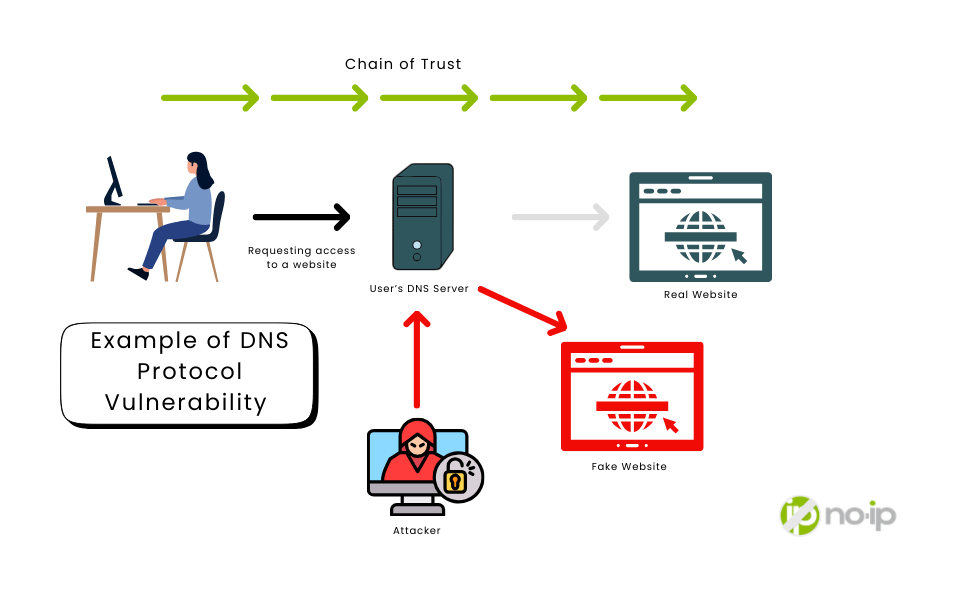
Traditional DNS assumes that responses are trustworthy. Unfortunately, there is no cryptographic proof that:
- The data came from the legitimate domain owner
- The response wasn’t altered in transit
This design enables attacks, such as DNS cache poisoning, where forged responses redirect users to malicious systems, often without any visible indication of compromise.
Think of DNS as a phone book anyone can edit. You look up a familiar number, dial it with confidence, and unknowingly reach an attacker.
How DNSSEC Works
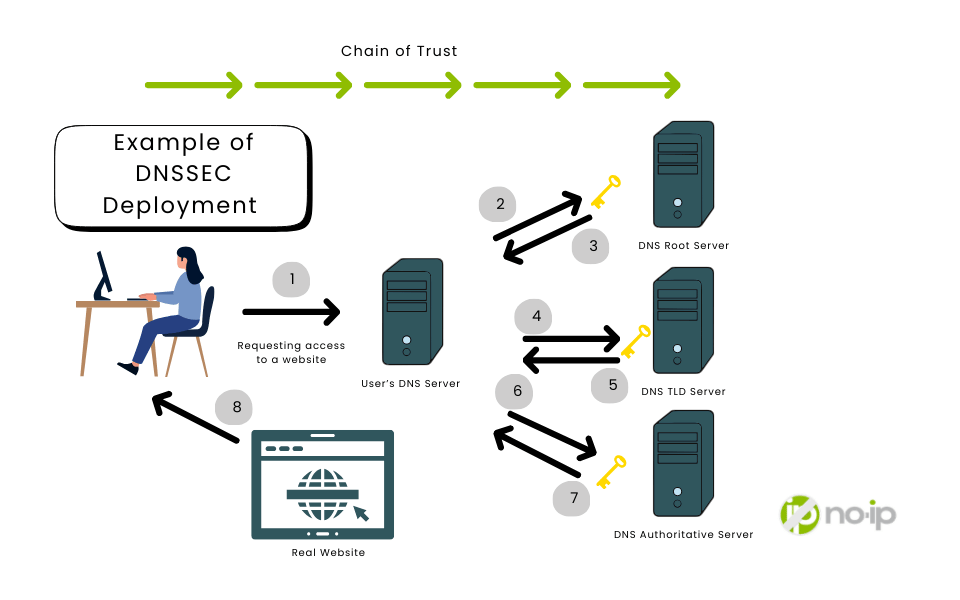
DNSSEC strengthens DNS by adding digital signatures based on public key cryptography. Instead of blindly trusting responses, resolvers can verify them.
At a technical level:
- Each DNS zone has a private key and a public key
- The private key is used to sign DNS records
- The public key is published in DNS and used for verification
When a DNSSEC-enabled resolver receives a response:
- It retrieves the record’s digital signature (RRSIG)
- It retrieves the zone’s public key (DNSKEY)
- It validates the signature against the data
- Valid signature → response is trusted
- Invalid or missing signature → response is rejected
Importantly, DNSSEC signs the data itself– not individual queries– therefore, caching and performance remain intact.
The Benefits of DNSSEC
As stated above, DNSSEC fixes this trust problem by adding cryptographic signatures to DNS records.
DNSSEC allows DNS resolvers to verify:
- Authenticity: Did this DNS data really come from the domain owner?
- Integrity: Was the data altered while traveling across the internet?
If verification fails, the resolver treats it as an attack and refuses to return the data.
DNSSEC is based on public key cryptography:
- Every DNS zone has a private key and a public key
- The private key is used by the zone owner to digitally sign DNS records
- The public key is published in DNS so resolvers can verify those signatures
When a recursive resolver receives DNS data:
- It retrieves the digital signature (RRSIG record)
- It retrieves the public key for the zone
- It verifies that the signature matches the data
- If valid → the response is trusted and returned
If invalid → the response is rejected
Importantly, DNSSEC signs the data itself, not the individual query or response. This allows DNS caching to continue working efficiently.
Deployment Reality: Why DNSSEC Isn’t Universal
DNSSEC must be enabled in two places to be effective:
- Authoritative DNS servers (domain owners sign their zones)
- Recursive resolvers (network operators validate signatures)
These roles often belong to different organizations with different incentives, which has historically slowed adoption. That said, tooling has improved, public resolvers are increasingly validating by default, and security expectations continue becoming the norm.
When DNSSEC is enabled end-to-end, DNS manipulation becomes significantly harder to execute silently.
When DDNS Makes Sense
If your organization manages the following, then DNSSEC is not a “nice to have”: It’s a foundational security measure that protects your digital presence at the most basic level.
- Operates a public website
- Handles customer data
- Relies on email delivery
- Provides online services
- Manages its own DNS or IT infrastructure
DNSSEC doesn’t solve every security problem. However, without it, even the strongest defenses can be undermined at the very first lookup.
For IT managers and business owners, DNSSEC offers tangible benefits:
- Reduced attack surface at the infrastructure level
- Stronger trust in web, email, and service delivery
Protection for customers and partners who rely on your domain - Future readiness as more security frameworks assume DNSSEC support
DNSSEC also enables innovation. New internet protocols increasingly depend on authenticated DNS data to function securely.
When DNSSEC Doesn’t Apply
DNSSEC is not a fix-all solution. It does not protect against:
- Phishing emails
- Fake websites hosted on correctly resolved domains
- User error or poor password practices
That distinction matters. DNSSEC doesn’t replace user awareness or application-layer security, but it does secure the foundation on which everything else relies.
Even highly experienced users can’t detect DNS manipulation. DNSSEC operates at a layer humans never see.
Alternative Ways to Keep Your DNS Secure
If DNSSEC is not the right fit for your network, it’s not the end of the world. There are alternatives to DNSSEC that still provide a level of security to your network. Here are some practical recommendations:
Use a trusted DNS provider with built-in redundancy
Utilizing a DNS provider that has a proven track record of service, you can rest assured knowing that your DNS is in the right hands. Using a trusted DNS provider is the best first step toward DNS reliability.
Today, implementing redundancy isn’t an arcane task. Modern tooling makes it straightforward to:
- Sync DNS records automatically across multiple providers
- Use diverse networks and geographies to improve resilience and latency
- Run active-active configurations to maintain uptime even during degradation
- Shift traffic seamlessly when one provider falters
Restrict Access to your DNS Account
Restricting access to your DNS account is more than just being protective over your login credentials. When you need to protect a network, Access Control Lists (ACLs) are some of your first lines of defense. ACLs act like digital bouncers that determine who gets in and who’s denied access. Commonly used in firewalls and routers, they allow or restrict traffic based on factors like the source or destination IP addresses, as well as protocols and ports.
A Domain Name System (DNS) ACL defines these permissions based on domain name resolution and IP behavior. For example, a DNS ACL may restrict access to a resource unless it comes from a trusted domain or IP.
DDNS-based firewall rules automate the updating process, which means your ACLs will easily reference correct and up-to-date information. Further benefits of using dynamic DNS firewall rules include:
- Eliminating the need to manually track IP changes
- Keeping your DNS ACL synced with real-time IP data
- Ensuring that only authorized devices gain access
- Spending less time configuring your DNS-based firewall rules
No-IP offers premium, industry-leading DDNS and managed DNS services that are perfect for firewall and ACL automation.
Enable Two-Factor Authentication for account access
One of the simplest ways of securing your network: Unauthorized changes in your DNS management platform are a big deal. They can lead to data breaches or other criminal activities. To ensure only necessary users have access to your DNS infrastructure, managed DNS security services implement key protection measures such as Two-factor authentication (2FA): This requires users to provide their login credentials and also a second factor to access the DNS platform.
Regularly review and update DNS records
Stay in the know! As things change or your business grows and expands, you will need to update DNS records to better handle the amount of traffic. A DNS record is where DNS servers create a record that provides important information about a domain, specifically the current IP address.
DNS Records do many different things. The different types of DNS records all work together to tell the Recursive DNS Server particular details and information about a domain, including the IP address of where it lives, email server information, redirects, and much more.
Deploy DNSSEC, If It Makes Sense
DNSSEC may not solve every security problem, but it fixes a critical one that has existed since DNS was created. For system administrators and IT professionals, it represents a rare opportunity to meaningfully improve security at the infrastructure level, where attacks are hardest to detect and easiest to trust by default.
If you care about the integrity of your services, DNSSEC is worth serious consideration. In fact, No-IP has some plans in the pipeline coming soon. Learn if DNSSEC is right for your organization.
FAQ
What does DNSSEC do?
DNSSEC (Domain Name System Security Extensions) is a set of protocol extensions that protect DNS by enabling resolvers to verify that DNS responses are authentic and unaltered.
Is DNSSEC the same as HTTPS or SSL?
Think of DNSSEC the same way you think about HTTPS: it adds a layer of security to a protocol that wasn’t originally designed with security in mind. Just like HTTPS improves on plain HTTP, DNSSEC improves on traditional DNS by making sure the answers you get are authentic.
That said, DNSSEC doesn’t encrypt anything. While HTTPS (via SSL/TLS) encrypts traffic so no one can snoop on data in transit, DNSSEC simply signs DNS responses. This allows resolvers to detect tampering or forged responses, solving a real and well-known problem without introducing encryption overhead.
Because DNSSEC works at the DNS level, it’s mostly invisible to end users. SSL, on the other hand, is very visible: think browser lock icons and certificate warnings. DNSSEC isn’t meant to replace SSL/TLS or compete with it. They operate at different layers and solve different problems. DNSSEC protects the DNS resolution process itself, ensuring users are directed to the correct server before any connection is made. SSL/TLS then takes over once the connection starts, encrypting the session and verifying the server’s identity.
Does No-IP support DNSSEC?
Interested in seeing if DNSSEC is the right fit for you? You can contact our team to learn more.
Who really needs DNSSEC?
For IT managers and business owners that may be handling customer data, rely on email delivery, and manage their own IT infrastructure, DNSSEC offers tangible benefits:
- Reduced attack surface at the infrastructure level
- Stronger trust in web, email, and service delivery
- Protection for customers and partners who rely on your domain
- Future readiness as more security frameworks assume DNSSEC support
What can I do instead to secure my DNS?
Here are some practical alternatives to DNSSEC:
- Use a trusted DNS provider with built-in redundancy
- Restrict Access to your DNS Account
- Enable Two-Factor Authentication for account access
- Regularly review and update DNS records