Why Domain Names Matter
Let’s start with the basics: Domains give us clues on the identity of a website. A domain can affect how you approach a website. Whether you are building a personal or professional brand, a domain is so much more than a name.
A domain name is the user-friendly text that someone types into a browser to access a specific website. Beneath every domain name is an IP address, a series of numbers that computers use to talk to each other. By using a domain name, users can reach a website without the need to memorize its numerical IP address, which can frequently change.
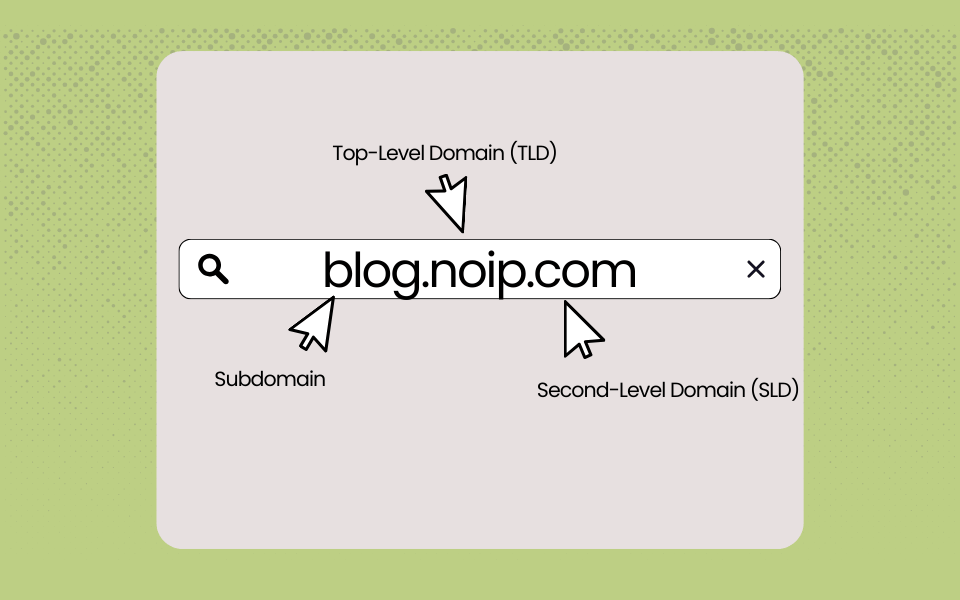
Think about the noip.com website. You’ll notice that domains are typically two or three parts. “Noip” is the second-level domain (SLD), and “.com” is the Top Level Domain (TLD). A TLD represents the first stop after the root zone and helps signal the purpose of domain names. The “.com” in the noip.com is intended for commercial businesses. Another example is “.gov”, which is reserved for US government organizations.
In addition, a subdomain is a prefix extension of your main domain and acts as a way of organizing separate sites or mini sites, such as blog.noip.com.
DNS: The Contacts List of the Internet
Think of DNS (Domain Name System) as the internet’s contact list. Just like you tap a friend’s name on your phone instead of memorizing their number, DNS lets you type “example.com” instead of a string of numbers like “192.168.1.1.” Without DNS, you’d need to remember and type the numerical IP address for every website you visit, and those numbers can change without warning. DNS automatically translates the domain names we know into the IP addresses computers need, making the web accessible and user-friendly for everyone.
How Domain Names Connect to an IP Address
Let’s break down how the domain resolution process works:
- The User types a domain name into their browser. Let’s use “NoIP.com”
- The browser queries a DNS server
- The DNS translates the name into an IP address
- The browser connects to that address to load the site or service
DNS servers allow people to type human-friendly words into a browser, such as “noip.com,” instead of remembering a website’s IP address (158.247.7.200). DNS allows domains to be more functional and customized for a better user experience. DNS servers work quietly behind the scenes by routing requests, resolving domain names, and connecting users to websites and internet-based services.
Once an IP address is located, browsers use it to communicate with origin servers to access a website’s information. DNS servers make this translation process seamless. They also allow websites to accommodate high traffic and dynamic IPs, which results in increased uptime and faster load times.
There are two main types of DNS servers: recursive and authoritative.
Recursive DNS Servers
The recursive DNS server, also known as a resolver, is the first stop in the DNS lookup process. When you enter a domain name, the resolver receives the query and checks its cache to see if it already has the corresponding IP address. If the information is cached, it returns the result immediately. If not, the resolver forwards the query to the appropriate nameservers to continue the search and retrieve the correct IP address.
After the recursive server receives information from the name server, it loads the data. The server then stores that information for a while, which allows the page to load faster in the future. Most of these types of DNS servers are provided by ISPs (“Internet Service Providers,” like Xfinity or Spectrum).
Authoritative DNS Servers
Authoritative DNS servers are usually the final stop in the DNS resolution process. These servers hold the published DNS records for a specific domain — the ultimate source of truth.
Two types of authoritative DNS servers play a vital role in the DNS lookup process: root nameservers and top-level domain (TLD) nameservers.
Once the authoritative server provides the answer, the information is sent back through the recursive resolver, allowing your browser to connect to the correct web server and load the site.
Who Manages Domain Names?
Domain Registrars
Registrars connect businesses and individuals to registries, enabling domain registration. Domain registration is a critical piece of domain management. It’s the process of reserving your unique domain name (i.e., yourbusiness.com) through a domain registrar, an accredited organization that operates under the oversight of the Internet Corporation for Assigned Names and Numbers (ICANN). A domain registry maintains the database of all domain names under a specific top-level domain (TLD), such as .com, .org, or .co.
DNS Providers
Managed DNS is a service offered by third parties, such as No-IP, to help administer, manage, and maintain your DNS. The top managed DNS providers also oversee the network and the infrastructure used to deliver DNS data. Managed DNS solutions automate your server management and DNS orchestration. Running your DNS server in-house requires you to stay up to date with the latest security measures. If a DNS server malfunctions or takes a long time to communicate with your website visitors, users may be unable to access your website until the server is fixed. A third-party managed DNS provider can help mitigate these risks and create seamless and reliable communication between a browser and your domain.
How DNS Brings Domain Names to Life
Your DNS provider oversees all the configuration and maintenance for your DNS servers. In return, you receive access to their infrastructure to manage your domain name. When a user enters your domain into their browser, they’re routed from your server to your DNS provider’s servers. It is these servers that store your resources and respond to a user’s search request. A managed DNS provider offers stress-free and seamless communication between a browser and your website.
Choosing the right managed DNS provider helps ensure users can reliably access your site without interruption and keeps your website secure from hackers or cyberattacks. At No-IP, we offer a variety of managed DNS services with 24/7 monitoring and support. We also offer Dynamic DNS solutions for reliable remote access to all your home devices.
What is a DNS record?
A DNS record is where DNS servers create a record that provides important information about a domain, specifically the current IP address.
DNS Records do many different things. The different types of DNS records all work together to tell the Recursive DNS Server particular details and information about a domain, including the IP address of where it lives, email server information, redirects, and much more.
For example, DNS Record (A) is the default and the most commonly used. It simply points a hostname to an IPV4 address. This change has a TTL (Time To Live) of 60 seconds. This means it will take 60 seconds to be live. The AAAA (IPv6) type is similar to an A record in that it points your hostname to an IP address, except in addition to pointing to an IPV4 it also points to an IPV6 address. TTL of 60 seconds.
Domain Names and Remote Access: Where No-IP Comes In
Without DDNS, you would have to update the settings in every single one of your devices to point to the correct IP address and go through the steps to verify that they are indeed connected. DDNS allows you to use an easy-to-remember hostname to access your internet-connected devices instead of having to remember and update that ever-changing IP address. DDNS allows you to secure remote access to a network, device, or application, which makes it possible to work remotely without compromising security.
Continuous connectivity and accessibility are key to managing your IP network in a way that is effortless and seamless. No-IP provides a DDNS service that allows you to assign a hostname to your dynamic IP address. Once you have signed up for a No-IP account and have installed the No-IP Dynamic Update Client on your device, the client will automatically update your IP address with No-IP whenever it changes.
How Managed DNS Simplifies Domain Control
For growing businesses, your domain and DNS setup impact how customers perceive your brand. Free DNS often injects ads, random redirects, or inconsistent subdomains that can look unprofessional. Furthermore, growth brings more records to manage, and free DNS providers often impose limits on queries or record types, while managed DNS offers flexible options and unlimited scalability.
Utilizing managed DNS services helps you stay connected with ease and trust. Thankfully No-IP does not have usage caps, or hidden fees, just unlimited queries. No-IP’s managed DNS services can optimize your website performance and ensure reliability.
No-IP has over 100 Points of Presence (PoP) using Anycast routing, which has provided consistent, reliable, and fast service to our users. Imagine if you were trying to maintain your business website on a service with only one or two PoP. If one or the other went down, you would experience excruciating lagging time. Plus, you run the risk of your customers not being able to access your site.
You can’t rely on a managed DNS service without having the ability to be flexible with your needs. A good service provider will allow you to keep what you want and customize to what you need. One size does not fit all! One of the things that No-IP is proud of is the ability to provide our diverse pool of users with different options to fit their network management best. Users can choose between different managed DNS service packages. These packages provide robust settings and a full suite of add-ons. Furthermore. these help expand their DDNS capabilities and set them up for continued success. By investing in managed DNS, you ensure your online presence is branded, consistent, and free of distractions, projecting trust and credibility to every visitor.
From Domain Names to DNS Reliability
Domains give us clues as to what a website is about, or what information you are going to get from it. In other words, domains are not just names for websites – They are an identity. A domain can affect how you approach a website. Managed DNS is a necessary business growth strategy.
Providers like No-IP can set your business up for success. Take a look at all the customizable options that No-IP has to offer and see how you can best maximize and support your growing network.
FAQ
What’s the difference between a domain name and DNS?
A domain name is the text that someone types into a browser window to reach a particular website. Every website has an IP address that is made up of a long string of numbers and letters. A domain is a way to access websites on the internet.
The Domain Name System (DNS) acts as the internet’s directory. It translates human-readable domain names into computer-friendly IP addresses — like an interpreter bridging two languages. When you enter a domain name into your browser, DNS looks up the corresponding IP address so your device knows where to connect.
Do I need DNS if I already have a domain name?
Yes because DNS is what is translating your domain name into an IP address. Without it, people would not be able to access your website.
How does DNS make websites accessible?
- The User types a domain name into their browser. Let’s use “NoIP.com”
- The browser queries a DNS server
- The DNS translates the name into an IP address
- The browser connects to that address to load the site or service
What are TLDs and SLDs?
Think about the noip.com website. You’ll notice that domains are typically two or three parts. “Noip” is the second-level domain (SLD), and “.com” is the Top Level Domain (TLD). A TLD represents the first stop after the root zone and helps signal the purpose of domain names. The “.com” in the noip.com is intended for commercial businesses. Another example is “.gov”, which is reserved for US government organizations.
How can I manage my domain’s DNS with No-IP?
No-IP provides a DDNS service that allows you to assign a hostname to your dynamic IP address. Once you have signed up for a No-IP account and have installed the No-IP Dynamic Update Client on your device, the client will automatically update your IP address with No-IP whenever it changes.