TL;DR:
• A device can be unreachable for several reasons: no public address, a shared carrier address, a locked router, or a firewall rule.
• Reverse tunnel remote access flips the direction so the device dials out and a service brokers connections back to it.
• No-IP Public Tunnels works this way, reaching services behind NAT, CGNAT, and restrictive firewalls.
Picture this: You forwarded the port. You checked the internal IP twice, gave the device a static lease, rebooted the router, ran an open port check from outside, and the port is still closed.
In a growing number of networks, that result has nothing to do with your configuration. The network has no inbound path to the device you are trying to reach, and no amount of time on the router’s admin page will create one. Let’s break down why that happens, what the general answer looks like, and where No-IP Public Tunnels fit in.
Four reasons a device stops being reachable
• It has no public address of its own. Almost every device on a home or office LAN holds a private address that is not globally routable. The router translates it on the way out, and an inbound connection has nowhere to land until you build a mapping by hand (this is usually called Port Forwarding).
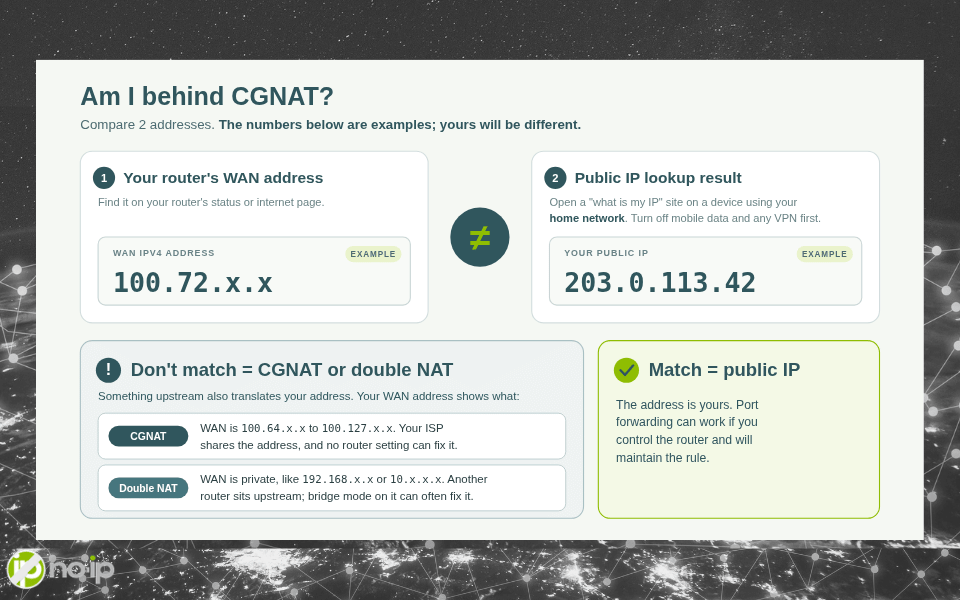
• The address is shared with other subscribers. Many ISPs run customers behind Carrier-Grade NAT (CGNAT) and number the link between the carrier’s NAT and your equipment out of a block of IP addresses reserved for exactly that job. Applications that need a peer to open an inbound connection to that outside address can fail, and peer-to-peer software often cannot open an incoming port through the carrier’s NAT at all. This is usually a hard stop – no router setting can fix this.
• You do not control the router. Plenty of fiber and cable providers ship combo modem-router units with limited or fully locked admin panels. When the port forwarding page is missing, grayed out, or behind firmware you cannot sign into, the router is the block.
• Port forwarding is not the right solution for the configuration. An inbound port makes that device directly reachable from the entire internet, and the rule needs an owner for as long as it exists. At a client site with a change process, or on any network with a security baseline, that is often a hard no before it is a technical question.
Any one of these is enough on its own. Two or three at once is ordinary on residential fiber, cellular uplinks, and satellite links.
The fix is a change of direction
Every problem in that list comes down to one thing: which side opens the connection. Inbound access asks the internet to reach in. Outbound access has the device reach out.
Outbound traffic is what makes browsing and app updates function, so it is permitted almost everywhere. A remote access model built on that fact inherits the permission instead of fighting for it.
Here is what that looks like. A client on the device opens an encrypted connection out to a tunnel service and holds it open. The service publishes an address for the one service you chose to expose. When you request access, your request travels the connection that already exists, in the direction the network already allows.
No inbound port has to be opened, no router page has to be found, and no call to the ISP has to be made.
Where No-IP Public Tunnels fits
No-IP Public Tunnels is a remote access service built on that model. A device inside your network opens a reverse tunnel to a secure access platform, and the platform brokers connections only when access is requested.
From the outside, access happens through a shareable URL instead of an IP address, a firewall rule, or a router setting. From your side, there is no inbound port to open. No router access is required!
Public Tunnels are designed to excel in the networks described previously: Double NAT, CGNAT, restrictive firewalls, ISP-managed connections, customer sites, and branch offices. CGNAT in particular turns up on satellite, cellular 3G/4G/5G, and ISP-managed networks.
Getting started is easy. Setup runs through your No-IP account and a client you install on the network you want to reach.
Two details to square with your own setup first. It currently comes with the Enhanced and Pro Dynamic DNS subscriptions rather than being sold separately.
No-IP Technologies, LLC has been running DNS infrastructure for self-hosters, businesses, and service providers for more than 25 years, and Public Tunnels is the reverse tunnel half of that story.
Port forwarding still has a job
None of this makes forwarding a port a mistake. If you own the router, hold a public address, and are willing to maintain the rule, forwarding a single service is still a reasonable call. The conditions it needs are just present on fewer networks than they used to be.
Public Tunnels and No-IP Dynamic DNS are separate products for different network conditions, and you can run one, the other, or both. They solve two different halves of the same problem: a hostname settles what you type, and a tunnel settles how you get there.
What still belongs on your checklist
Taking away the open port removes one category of risk, not all of them.
Put authentication in front of anything reachable from outside, whether that is the login screen the application already ships with or a gate you add yourself. Most importantly, keep the service up to date. Treat the access URL the way you treat a password: hand it out deliberately, and never paste it into a public thread.
The gain is still real. The most common failure in home network security is a forwarded port sitting open on a device nobody has thought about since the day it was set up.
Which one describes your network
Three questions settle it: Do you have a public address of your own? Do you control the router? Are you willing to own an inbound rule for as long as the service exists?
If there are three yes answers, then port forwarding is a reasonable choice. Any no answers on that list, then reverse tunnels is the model you need.
If you are not certain which situation you are in, the test takes a minute. Compare the WAN address your router reports against the address a public IP lookup returns for you. If those two disagree, you are sitting behind a carrier NAT, and there is nothing on the router to fix. Run the same check at a client site, and you will know whether to open a change request or skip straight to a tunnel.
We covered the same ground from the homelab side in how to access a home server without port forwarding.
Fewer networks hand out a public address every year, and more of them ship a router you will never be allowed to log into, so pick the remote access model that assumes those conditions instead of arguing with them.
See how No-IP Public Tunnels handles the networks you were never given the keys to.
FAQ
Why is my port still closed after I set up port forwarding?
Your network may have no inbound path to the device, no matter how the router is configured. The 4 usual causes are a device with only a private address, an ISP that shares one public address across subscribers (CGNAT), a router you can’t fully configure, and a security policy that doesn’t allow inbound ports. Any one of these is enough to block remote access, and residential fiber, cellular, and satellite connections often have 2 or 3 at once.
What is CGNAT?
Carrier-Grade NAT (CGNAT) is a setup where your ISP puts many customers behind one shared public IP address. The link between the carrier’s NAT and your equipment uses addresses from a block reserved for that purpose, so incoming connections can’t reach your device. No router setting can fix this, because the blocking NAT is on the ISP’s side.
How can I tell if I’m behind CGNAT?
Compare the WAN address your router reports with the address a public IP lookup site shows for you. If the 2 addresses don’t match, you’re behind a carrier NAT, and changing router settings won’t help.
What is reverse tunnel remote access?
Reverse tunnel remote access means the device opens the connection. A client on the device opens an encrypted connection to a tunnel service and keeps it open. When you request access, your traffic travels over that existing connection, so you don’t need to open an inbound port, change router settings, or call your ISP. It works on most networks because reverse traffic, the same traffic that lets you browse and install updates, is allowed almost everywhere.
What is No-IP Public Tunnels?
No-IP Public Tunnels is a remote access service that uses the reverse tunnel model. A client on your network opens an encrypted tunnel to No-IP’s secure access platform, and the platform brokers connections only when someone requests access. You reach the service through a shareable URL instead of an IP address, a firewall rule, or a router setting.
Do I need to open a port or log in to my router to use Public Tunnels?
No. Public Tunnels needs no inbound port or router access. You set it up through your No-IP account and a client installed on the network you want to reach.
Which networks does Public Tunnels work on?
Public Tunnels is built for networks where port forwarding fails or isn’t allowed:
- Double NAT
- CGNAT
- restrictive firewalls
- ISP-managed connections
- customer sites
- branch offices
CGNAT is especially common on satellite, cellular, and ISP-managed networks.
How do I get No-IP Public Tunnels?
Public Tunnels is included with the Enhanced and Pro Dynamic DNS subscriptions. It isn’t sold as a separate product.
Is port forwarding still a good option?
Yes, when 3 things are true: you have your own public IP address, you control the router, and you’re willing to maintain the inbound rule for as long as the service exists. If any of those is missing, an reverse tunnel is the better fit.
What’s the difference between No-IP Public Tunnels and No-IP Dynamic DNS?
They’re separate products for different network conditions. Dynamic DNS gives you a hostname that follows your changing IP address, which settles what you type. Public Tunnels gives you a path to a device that can’t accept inbound connections, which settles how you get there. You can use either one or both.
What security steps should I take with a tunnel?
Removing the open port takes away 1 category of risk, not all of them. Put authentication in front of anything reachable from outside, either the login screen the application already has or one you add. Keep the service updated. Treat the access URL like a password: share it deliberately and never post it in a public thread.