TL;DR
Secondary DNS adds a second authoritative DNS provider that keeps a copy of your zone through zone transfers and answers queries alongside your primary provider. If the primary goes down, resolvers ask the secondary, and your domain keeps resolving. To choose a secondary DNS provider, start with zone transfer support, then check DNSSEC, monitoring, and pricing.
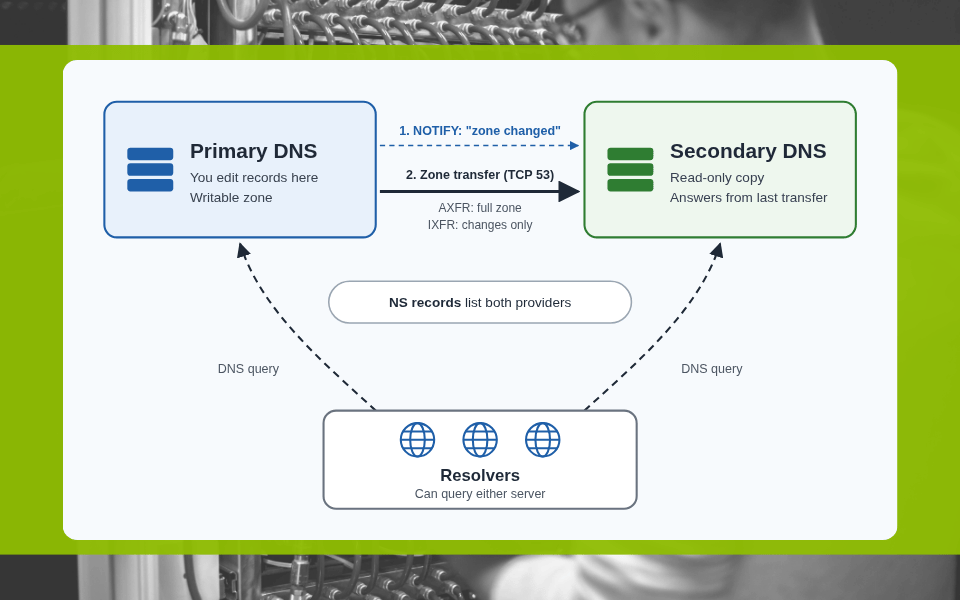
- The primary holds the editable zone, and the secondary receives a read-only copy through AXFR or IXFR zone transfers, triggered by NOTIFY and the SOA serial
- Both providers’ nameservers must be listed in the NS records at your registrar, or the secondary never receives queries
- Secondary DNS covers a provider outage, but bad record edits still copy over, and it can’t stop a registrar account takeover
- Your current primary must allow outgoing zone transfers to an external provider, or you need to run your own DNS server
- Provider checklists should cover zone transfers (AXFR, IXFR, NOTIFY), TSIG, DNSSEC, network footprint, record types, API, monitoring, pricing, and support
If one provider answers every DNS query for your domain, that provider’s outage is your outage. Secondary DNS adds a second set of authoritative DNS servers, usually from a different provider, so your domain has redundancy at the nameserver level. This guide covers how it works, how it differs from primary DNS, who uses it, and what to check before you choose a secondary DNS provider.
What Is Secondary DNS?
Every domain has authoritative DNS servers. They hold the domain’s zone (its full set of DNS records) and give the final answer when a resolver asks where www.example.com or mail.example.com points.
Most domains start with one provider in that role. Secondary DNS adds another authoritative server that keeps a synchronized copy of the zone, and answers queries exactly as the primary does. Resolvers treat both as equally authoritative.
The primary (master, in older documentation) is where you edit records. The secondary (slave, in older documentation) receives copies of the zone and serves them. When the two run on separate providers and separate networks, a failure at one leaves the other answering for your domain. That’s the redundancy secondary DNS exists to provide.
Secondary DNS vs. the secondary DNS server field on your router
Routers and laptops often ask for a “secondary DNS server” such as 8.8.4.4, a fallback resolver your device uses to look up any website. This post covers the other meaning: a second authoritative server that answers for your own domain.
How Does Secondary DNS Work?
Two mechanisms do the work. Zone transfers keep the secondary’s copy current, and NS records tell the world to ask either server.
Zone transfers keep the copy in sync
Every zone has an SOA (start of authority) record with a serial number. Each time you change a record on the primary, the serial goes up. The secondary compares its serial with the primary’s, and when the primary’s is higher, it requests a zone transfer.
There are two kinds of transfer:
- AXFR copies the full zone, every record, every time
- IXFR copies only the records that changed since the serial the secondary already has, which matters for large zones
The secondary checks for changes on a schedule set by the SOA refresh value, which can be hours. NOTIFY shortens that wait. With NOTIFY turned on, the primary sends a message to its secondaries as soon as the zone changes, and they check for a new serial right away.
Transfers run over TCP port 53, so firewalls between the two servers need to allow it. Many setups also authenticate transfers with TSIG (transaction signatures), a shared key that signs each request, so only your secondary can pull the zone. Others restrict transfers by IP address.
Both servers answer queries
Your domain’s NS records, set at the registrar and inside the zone, list nameservers from both providers. Resolvers can send a query to any of them and often favor whichever responds fastest. In normal operation, both providers handle live traffic for your domain.
What happens during a primary outage
If the primary’s nameservers stop responding, resolvers that get no answer retry against the other nameservers in the NS set. The secondary answers from its last copy of the zone, and your records keep resolving. Some lookups may take longer while resolvers time out on the unreachable servers first.
Resolvers that already cached your records keep using them until the TTL runs out, and Understanding TTL in DNS explains how that timer works.
The outage still has limits. You usually can’t edit records until the primary is back, because edits happen there. And if the primary stays unreachable longer than the SOA expire value (often 1 to 4 weeks), the secondary stops answering for the zone, on the assumption that its copy has gone stale.
How secondary DNS works with No-IP
No-IP’s secondary DNS service is Squared Backup DNS. You enter your primary server’s IP address in your No-IP account, allow zone transfers and NOTIFY from your primary to No-IP’s transfer server, and add ns1 through ns4.no-ip.com to your NS records. The transfer server pulls the zone and isn’t listed in your zone. No-IP can also act as the primary and transfer zones out to another provider, if you’d rather keep No-IP as the source of truth.
For why two providers matter, see The Importance of DNS Diversification. For exact settings, use the Squared Backup DNS setup guide.
Primary vs. Secondary DNS: What’s the Difference?
Both servers answer queries with the same authority. The difference is where the records come from and what each can do when something fails.
| Attribute | Primary DNS | Secondary DNS |
|---|---|---|
| Where records are edited | Here, through a dashboard, API, or zone file | Usually nowhere. Changes arrive from the primary. |
| Read-only or writable | Writable | Read-only copy |
| How it gets its data | Directly from you | Zone transfers (AXFR or IXFR) from the primary, usually triggered by NOTIFY |
| Listed in NS records | Yes, unless set up as a hidden primary | Yes |
| Role in normal operation | Answers queries and sends NOTIFY messages and zone transfers to secondaries | Answers queries from its synchronized copy |
| Role during an outage | If it’s down, it can’t answer queries or accept edits | Keeps answering from its last copy until the SOA expire time |
No-IP can fill either role. Managed DNS can be your primary, or Squared Backup DNS can sit behind a primary you already run.
Who Uses Secondary DNS?
You run your own DNS server
If your zone lives on a BIND, PowerDNS, or Windows DNS server, that server is a single point of failure. One power cut, ISP outage, or failed update takes down every hostname it serves at once: the website, MX records for email, and the VPN hostname your remote staff connects to.
A secondary from a hosted provider keeps those names resolving, and your records stay on your server where you already manage them. You can go a step further with a hidden primary. Your server drops out of the public NS records and only talks to the secondary for zone transfers. Its IP address isn’t advertised to the internet, and it no longer handles public query traffic.
You use a hosted DNS provider
Hosted providers have outages too, and a DDoS attack aimed at one provider can affect every domain on its network. A second provider protects you against one vendor’s bad day.
The requirement here is outgoing zone transfers. Your current provider has to let an external secondary pull the zone. Some providers allow it on every plan, some only on higher tiers, and some not at all, so check before you plan around it.
Is Backup DNS the Same Thing as Secondary DNS?
Usually, yes. Providers often use “backup DNS” to mean secondary DNS, and No-IP’s Squared Backup DNS is a secondary DNS service.
The term is loose, though. Some guides use “backup DNS” for the fallback resolver on a router, which is the consumer setting covered earlier. Backing up your DNS records is a third thing: an exported zone file that you can restore from. That file sits on disk and answers no queries, while a secondary answers live traffic for your domain.
Benefits and Limits of Secondary DNS
Benefits:
- Your domain keeps resolving if one DNS provider has an outage
- An attack or network failure at one provider leaves the other provider’s nameservers answering
- You keep your current primary, records, and editing workflow, with no migration
- You can test a new provider against a live zone before moving your primary there
Limits:
- Edits happen at the primary, so you usually can’t change records while it’s down
- It only helps when both providers are listed in the NS records at the registrar
- Mistakes replicate: a wrong record on the primary transfers to the secondary
- Provider-specific record types, such as ALIAS or traffic-steering records, often don’t transfer because they aren’t standard DNS records
- DNSSEC needs coordination, because both providers must serve correctly signed answers
- It doesn’t protect against a registrar account takeover, since whoever controls the registrar can change every nameserver
How to Choose a Secondary DNS Provider
A secondary DNS provider has to stay in sync with your primary and answer correctly. Compare providers on these criteria.
| Criterion | Why it matters | What to ask |
|---|---|---|
| Zone transfer support (AXFR, IXFR, NOTIFY) | Without AXFR or IXFR, the provider can’t copy your zone. Without NOTIFY, changes wait for the SOA refresh timer, which can be hours. | Do you accept inbound AXFR and IXFR? Do you act on NOTIFY, and how quickly do changes go live? |
| TSIG authentication | TSIG signs each transfer with a shared key, so only your secondary can pull the zone. | Do you support TSIG keys, and which algorithms? |
| DNSSEC compatibility | If one provider serves a signed zone incorrectly, validating resolvers can reject your answers. | Can you serve a zone signed at the primary? Do you support multi-signer setups? |
| Network footprint | Nameserver locations and Anycast routing decide how quickly resolvers reach the secondary. | Do you run Anycast? Where are your PoPs relative to my users? Is there independent measurement? |
| Record-type support | Any record type the secondary can’t serve won’t resolve from it. | Which record types do you serve from a transferred zone? Are there zone size or record limits? |
| Pricing and limits | Per-zone and per-query pricing adds up across many domains. | Is pricing per zone, per query, or both? What happens if I go over a limit? |
| Support | Transfer failures usually come down to firewall rules or ACLs, and you need someone who can read them. | Who answers support tickets, during which hours, and through which channels? |
This checklist works for any provider, including No-IP. Squared Backup DNS supports NOTIFY and pulls zones from a dedicated transfer server, and the setup guide covers the rest of the requirements. If you’re comparing options for a primary and a secondary at the same time, the Managed DNS page lists plan details for both.
How to Set Up Secondary DNS (High-Level)
Exact steps vary by server and provider, but the sequence is the same:
- Pick a secondary provider that accepts zone transfers from your primary.
- Allow zone transfers at the primary. Add the secondary’s transfer IP addresses (and a TSIG key, if you use one) to the allow list, turn on NOTIFY, and open TCP and UDP port 53 to the secondary.
- Configure the secondary with your zone name and your primary server’s IP address.
- Verify the zone copy. Increment the SOA serial on the primary, then query the secondary directly and confirm the serial matches.
- Update NS records. Add the secondary’s nameservers to the NS records in your zone and at your registrar, alongside your primary’s nameservers (or in place of them, for a hidden primary).
- Test. Confirm that every listed nameserver answers for your domain.
For steps 4 and 6, dig does the job:
dig @ns1.secondary-provider.example example.com SOA +short dig example.com NS +short
The first command should return the same serial as your primary. The second should list nameservers from both providers.
Setting up secondary DNS with No-IP
In your No-IP account, go to My Services, then Backup DNS, and enter your primary server’s IP address. On your primary, allow zone transfers and NOTIFY to No-IP’s transfer server and open port 53 (UDP and TCP) to it. Verify with dig @ns1.no-ip.com, then add ns1 through ns4.no-ip.com as NS records in your zone and at your registrar. The setup guide has the transfer IP and BIND examples.
Frequently Asked Questions
What is the difference between primary and secondary DNS?
The primary DNS server holds the editable copy of your zone, and it’s where you add and change records. The secondary DNS server holds a read-only copy that it receives through zone transfers. Both are listed in your NS records and answer queries with equal authority, so either one can respond to resolvers.
Do I need a secondary DNS provider?
You need one if a DNS outage at your current provider would take down something that matters, such as your website, email, or remote access. Running your own DNS server makes the case stronger, since that server is a single point of failure. A secondary provider keeps your domain resolving when the primary is unreachable.
How does a secondary DNS server get its records?
A secondary DNS server gets its records through zone transfers from the primary. It compares SOA serial numbers and requests a full transfer (AXFR) or an incremental one (IXFR) when the primary’s serial is higher. With NOTIFY turned on, the primary alerts the secondary as soon as records change, so updates arrive quickly.
Can I use two DNS providers at once?
Yes. List nameservers from both providers in your NS records at the registrar, and keep the zones in sync, usually by having one provider act as primary and transfer the zone to the other. Your current provider must allow outgoing zone transfers to an external secondary, so confirm that before you set anything up.
Is secondary DNS the same as backup DNS?
Usually, yes. Many providers use “backup DNS” to mean secondary DNS, a second authoritative server that answers queries for your domain. The term is also used loosely for a router’s fallback resolver, such as 8.8.4.4. Backing up your DNS records, meaning an exported zone file, is a separate thing that answers no queries.
Where to Start
Secondary DNS adds provider-level redundancy to your domain without moving your records or changing how you edit them. Choose a provider on zone transfer support first, then on DNSSEC, monitoring, and fit with the rest of your stack. If you want No-IP as your primary, your secondary, or both, compare plans on the Managed DNS page and add secondary DNS to the domain you’d least like to see go dark.