TL;DR
Port forwarding used to be the go-to for remote access. You open a port, expose a service, and done. But that model is a liability in today’s threat landscape. Zero Trust Network Access (ZTNA) flips the script. Instead of trusting anything inside the network perimeter, it verifies every user, device, and connection every single time. Tools like No-IP’s Public Tunnels make the transition practical by enabling secure, outbound remote access that works even behind CGNAT and restrictive firewalls with no open ports required.
Why Port Forwarding Was the Standard for Remote Access
Port forwarding is a method of routing connections over the internet to a device on a local network. By configuring port forwarding, you can enable a variety of services such as remote access to a server, hosting a game server, or self-hosting a website.
It maps a public-facing port to an internal host. When traffic arrives from the internet, your router decides where it goes. Port forwarding gives it a strict rulebook. Clean, direct, and controlled by whoever manages the router.
However, port forwarding doesn’t apply to all remote access configurations. Managing open ports at scale creates a second layer of operational risk. Automated scanners identify open ports within minutes of them appearing. If the service behind an open port carries an unpatched vulnerability, that port is the delivery path for exploiting it. See how technology has evolved from open ports to reverse tunnels.
The Evolution of Remote Access: From Port Forwarding to Reverse Tunnels
The Need for More Secure Remote Access
The push to find remote access alternatives other than port forwarding accelerated as networks became more distributed and attackers got smarter. A few forces made the model untenable:
Exposure to external threats. The firewall that would otherwise block unsolicited inbound traffic has been explicitly instructed to pass it through. The attack surface is as wide as the service you are exposing.
Increased complexity for IT teams managing multiple client sites. Each client has its own router, NAT config, and port mappings. When something breaks, you’re jumping between admin interfaces hoping your documentation is current. That is why port forwarding needs to be managed by someone with experience and education.
Security challenges with trust-based models. Perimeter security assumes anything inside the network is trusted. That assumption collapses the moment there’s a compromised credential or insider threat.
Introducing Zero Trust Network: A New Security Paradigm
What Is Zero Trust?
Zero Trust is built on one core principle: never trust, always verify. It emphasizes minimizing implicit trust and reducing unnecessary access. No user, device, or connection is trusted by default, regardless of network location. Every access request is treated as potentially hostile until verified.
The three core pillars:
Identity and Access Management (IAM). Every access request must be tied to a verified identity, enforced through MFA and centralized identity providers.
Least Privilege Access. Authenticated users get access only to what they need — nothing more. A technician remoting into a file server shouldn’t automatically have access to the firewall admin interface.
Continuous Verification. Zero Trust doesn’t just verify at login. It monitors sessions and can revoke access in real time based on anomalous behavior, device compliance issues, or policy changes.
Zero Trust Network vs Traditional Remote Access Methods
Traditional Network Perimeter Security
The classic model draws a hard boundary between “inside” (trusted) and “outside” (untrusted). Trust is granted based on network location and remote access relies on inbound connections through public IPs. Once an attacker breaches the perimeter, lateral movement is largely unchecked. Cloud workloads, remote workers, and SaaS tools have already made this perimeter largely fictional.
How Zero Trust Transforms Remote Access
Zero Trust replaces the underlying assumptions entirely. Authentication is based on user identity, device health, and context, not network position. Remote access is initiated from within the network via secure outbound tunnels, eliminating the need for inbound ports. And access is continuously monitored, with permissions enforced throughout the session, not just at login.
How No-IP Public Tunnels Align with Zero Trust Network Access
Public Tunnels as a Bridge to Zero Trust
No-IP Public Tunnels provides secure remote access by establishing outbound-only encrypted tunnels from devices on your managed networks. Remote users connect through those tunnels without any direct inbound connection to the target device. In other words, no open ports required.
Key benefits include secure access for remote devices, operation behind CGNAT and restrictive firewalls, and no port forwarding dependency. Zero Trust features include identity-based access controls, encrypted tunnel connections, centralized access management, and no persistent open ports all by design.
Benefits of Zero Trust Network Access with Public Tunnels
Strengthening Security
No open inbound ports means port scanners and bots find nothing to probe. Only authenticated users and devices can connect, and access decisions are enforced before a connection is established. And because access is based on identity rather than location, the VPN-era assumption that “if they’re on the network, they belong there” is gone.
Simplified Network Management
Outbound tunneling works regardless of CGNAT or firewall rules. It’s a game-changer for MSPs dealing with double-NAT and ISP restrictions. Adding new sites or devices no longer requires documenting IPs, configuring port forwards, and updating firewall rules. Simply deploy the tunnel agent, authenticate it, and you’re in. Manage everything, such as access policies, tunnel status, and connected devices, from a single dashboard.
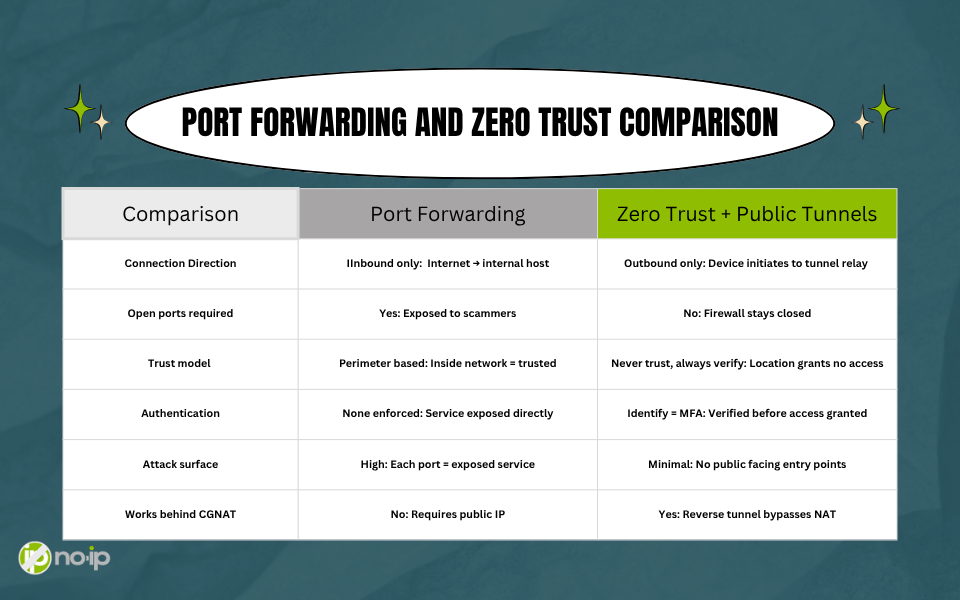
💡 Diagram suggestion: Side-by-side comparison chart showing port forwarding vs. Zero Trust models. Alt text: “Comparison of remote access methods: Port forwarding versus Zero Trust with Public Tunnels.”
When Is It Time to Transition to Zero Trust Network Access?
For most organizations, the answer is now. Networks are increasingly distributed, incidents tied to exposed ports are rising, and managing port forwarding rules across client sites is unsustainable. Clients in regulated industries are often asked about security posture.
Making the shift to Zero Trust involves three moves:
- implement IAM with MFA and SSO as the foundation
- adopt automated access policies
- replace port-forwarding-based remote access with tools like No-IP Public Tunnels.
Start by closing the highest-risk ports first so you don’t have to do it all at once.
The Future of Remote Access: Zero Trust and Beyond
The arc of remote access bends toward less implicit trust and more explicit verification from port forwarding and VPNs, to secure tunnels and Zero Trust, and beyond.
Protected Tunnels represent the next step:
- Deeper traffic inspection
- Hardware-backed encryption
- Tunnel-level policy enforcement
Zero Trust applies not just to who can connect, but to what flows through the connection.
Identity-driven remote access is where things ultimately land, such as access decisions based entirely on user, device, and application identity. No IP addresses, port numbers, or implicit trust anywhere.
With the perimeter gone, Zero Trust is how you adapt. Tools like No-IP Public Tunnels allow you to get there without ripping out your existing infrastructure.
Ready to close those open ports? Explore No-IP Public Tunnels and start building a remote access strategy built for today’s threat landscape.
FAQ
Q: Is Zero Trust just for large enterprises?
No. It’s a framework, not a product, and therefore can scale down as well as up. The key is adopting the principles (least privilege, identity verification, outbound tunneling) rather than deploying a full enterprise SASE stack overnight.
Q: Can I use No-IP Public Tunnels if my client is behind CGNAT?
Yes. Because Public Tunnels establishes connections outbound from the managed device, CGNAT is irrelevant. Therefore, no inbound routing is required.
Q: Do I need to replace my entire VPN infrastructure to adopt Zero Trust?
Not immediately. Many organizations run a hybrid model during transition. Start with the highest-risk access paths that include exposed RDP or unmonitored admin interfaces. Then, work from there.
Q: What’s the difference between a VPN and Public Tunnels?
A VPN typically extends broad network-level access to a remote device. Public Tunnels provides access to specific services or devices with identity-based controls, without putting the remote device “on” the internal network.
Q: What are Protected Tunnels, and how are they different from Public Tunnels?
Protected Tunnels add deeper inspection, tighter encryption, and more granular policy enforcement at the tunnel level. Where Public Tunnels eliminate open ports, Protected Tunnels extend Zero Trust controls into the data path itself. The natural next step for environments with stricter security requirements.