Last updated September 17th, 2026
TL;DR
Learn about reverse proxies and reverse tunnels that both route traffic to internal services, but they solve different problems, and introduces No-IP Public Tunnels, which is now live. A reverse proxy sits in front of your servers and handles inbound traffic, such as load balancing, SSL termination, and path-based routing. If you manage your network and need streamlined traffic routing, apply a reverse proxy. It requires a public IP and open inbound ports to operate. A reverse tunnel flips the model: the internal device initiates an outbound connection to an external relay, making it obtainable without a public IP, open ports, or router configuration. If you manage your network and need intelligent traffic routing, use a reverse proxy. If you’re behind a CGNAT, a locked-down ISP router, or a network you don’t manage, a reverse tunnel is the solution that actually works.
Reverse Proxy vs Reverse Tunnel: Two Tools, Two Different Problems
If you’ve spent any time setting up remote access, self-hosting services, or a distributed infrastructure, you may have come across the terms reverse proxy and reverse tunnel. If you’ve ever Googled one expecting a clear answer, you’ve probably walked away with more questions than you started with.
These two technologies sound similar, operate in vaguely overlapping spaces, and both involve routing traffic in convoluted ways. But they solve different problems fundamentally. Mixing them up can lead you down the wrong path when you’re trying to architect a reliable remote access solution.
Let’s break down what each one actually does, where they differ, and when you’d reach for one over the other.
Traffic Direction
Let’s first understand what “reverse” actually means in networking contexts.
A forward proxy sits between a client and the internet, making requests on the client’s behalf. A reverse proxy sits in front of a server, intercepting requests on the server’s behalf. A reverse tunnel flips the connection model entirely. Instead of waiting for an inbound connection, the internal device reaches out and establishes the connection from the inside.
That distinction, inbound vs. outbound initiation, is the single most important thing to understand when comparing these two approaches.
What Is a Reverse Proxy?
A reverse proxy is a server that sits in front of one or more backend services and forwards incoming client requests to the right destination.
When a user sends a request to your domain, they aren’t talking directly to your backend server. Instead, the reverse proxy receives the request, decides where it should go, and forwards it. The response comes back through the proxy, which then returns it to the user. However, from the client’s perspective, they’re just talking to a single endpoint.
What Reverse Proxies Are Great For
Load balancing
If you’re running multiple instances of an application, a reverse proxy can distribute incoming traffic across them, preventing any single server from getting overwhelmed.
SSL termination
At the proxy layer, you can handle encryption and decryption at the proxy layer instead of configuring TLS on every single backend service. Internally, your backend services can communicate over plain HTTP while the outside world still gets HTTPS.
Caching
Reverse proxies like NGINX or Varnish can cache responses and serve them without hitting the backend, which dramatically reduces latency for repeated requests.
Security and access control
The proxy acts as a gatekeeping layer. That means you can enforce the following:
- Authentication
- Rate Limiting
- IP Allowlisting
- WAF (Web Application Firewall) rules
All these are done in one centralized place instead of being implemented independently on every service.
Path-based routing
A single domain can serve multiple backend services. For example, requests to /api go to one service, and requests to /app go to another. This is common in microservices architectures.
What a Reverse Proxy Requires
There’s an important thing to remember about reverse proxy: Fundamentally, it is still dependent on inbound connectivity. This means the proxy itself must be reachable from the Internet. That means you need a public IP address, open ports (typically 80 and 443), and a network configuration that allows inbound traffic to reach your proxy server.
If you’re in a controlled environment, such as a cloud VPS, a data center, or a well-managed office network, this isn’t usually a problem. However, if your infrastructure is situated behind a NAT layer you don’t control, a locked-down ISP router, or Carrier-Grade NAT (CGNAT), a reverse proxy alone doesn’t solve your connectivity problem. You’ve just moved to where the publicly reachable endpoint needs to be.
Common reverse proxy tools include NGINX, HAProxy, Traefik, and Caddy.
What Is a Reverse Tunnel?
A reverse tunnel, on the other hand, takes a different approach. Instead of waiting for an inbound connection to arrive, the device inside the network initiates an outbound connection to an external endpoint. Once that outbound connection is established, remote clients connect to the relay, and the relay routes traffic back through the existing tunnel to reach the internal device.
The result is that the internal device is reachable from the outside world, without ever needing to accept an inbound connection directly.
Why That Difference Matters
Outbound connections are rarely blocked. Unlike the following that restrict inbound traffic by design:
- Firewalls
- NAT layers
- ISP-managed routers
- CGNAT
But outbound connections? Those are typically allowed by default because they’re what your devices use to browse the web, make API calls, and do pretty much everything else.
By having the internal device reach outbound first and maintain a persistent connection to an external relay, you are able to bypass network restrictions that would make inbound connections impossible.
This is why reverse tunneling solutions like No-IP Public Tunnels work in environments where traditional remote access consistently fails. This includes behind CGNAT, on ISP-managed routers where you have no admin access, or in enterprise networks with strict default-deny inbound firewall policies.
What Reverse Tunnels Are Great For
Accessing devices behind restrictive networks
If you need to reach a device at a remote office, or a network you don’t control, a reverse tunnel gives you a reliable path regardless of what the underlying network looks like.
Eliminating the need for public IPs
A reverse tunnel solution handles the public-facing endpoint for you. The internal device just needs outbound internet access, which is something nearly every network allows.
Simplifying multi-site deployments
Traditionally, you would need to configure port forwarding rules across dozens of different routers with different ISPs and firewall configurations. With reverse tunnels, you deploy a tunnel client during the initial startup and immediately get consistent, standardized access everywhere.
Remote support and troubleshooting
MSPs and IT teams can reach equipment at client sites securely without needing to coordinate router changes or involving the client’s ISP every time they need access.
What a Reverse Tunnel Requires
The tunneling software or client is required to run on the internal device. In addition, there needs to be an external relay, either a self-hosted one or a managed platform like No-IP Public Tunnels. The internal device needs outbound internet access, which thankfully is almost always available.
Most importantly, is that it does not require a public static IP, open inbound ports, admin access to the router, or coordination with the ISP.
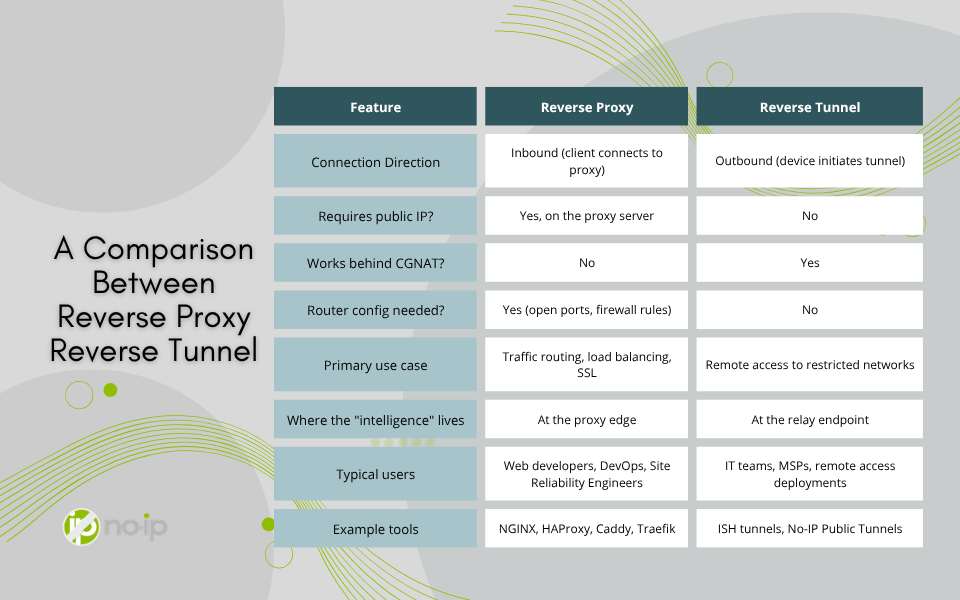
A Comparison Between Reverse Proxy and Reverse Tunnel
Where People Get Confused
The overlap between reverse proxy and reverse tunnels happens because both technologies can be used to expose internal services to external users. For example, if you want someone outside your network to access a service running internally, both approaches can technically work under the right conditions.
The mistake is treating them as interchangeable alternatives, which they’re not. A reverse proxy and reverse tunnels are designed for fundamentally different constraint sets.
A reverse proxy is the appropriate tool when you already have inbound connectivity and need:
- Intelligent Routing
- Caching
- SSL Termination
- Load Distribution
A reverse tunnel is the right tool when inbound connectivity isn’t available, reliable, or configurable, but you need access anyway.
In practice, you’ll often see both used together. A reverse tunnel might establish the connection path, and then a reverse proxy sitting behind it might handle routing, SSL, and caching for the services being used. In other words, they’re complementary, not competing.
Real-World Scenarios
Scenario 1: Web Application on a Cloud Server
You’re running a multi-service web application on a VPS. You have a static public IP and full control over the network. In this case, a reverse proxy is exactly what you want. NGINX or Traefik can handle path-based routing, SSL termination, and load balancing with no tunnel required.
Scenario 2: Accessing a NAS Behind a Home ISP
You have a NAS at home, and you want to access it remotely, but your ISP uses CGNAT. Your router’s WAN IP doesn’t match your actual public IP, and you have no way to configure inbound rules at the ISP level. This is where a reverse tunnel is the more appropriate application. Set up a tunnel client on the NAS, connect it to a managed relay, and you have reliable access regardless of ISP behavior.
Scenario 3: MSP Supporting Client Equipment
You’re an MSP managing equipment across dozens of client sites. Each site has its own ISP, router, and firewall policy, and you can’t count on having admin access at all of them. A reverse tunnel deployed on the managed equipment provides a standardized remote access across every client, with no per-site router configuration required. This is exactly the problem No-IP Public Tunnels is designed to solve.
Scenario 4: Distributed Microservices
Your services are split across multiple internal servers, and you want external traffic to route correctly based on the requested path. If you have a public-facing endpoint with inbound access, a reverse proxy handles this effectively. If that endpoint is also behind a restrictive network, you might pair it with a tunnel to establish the initial connectivity.
Which One Do You Actually Need?
Here’s the short version:
Choose a reverse proxy when you:
- already have inbound internet connectivity
- need traffic distribution, caching, or SSL termination
- are building or managing a web-facing application architecture
- want centralized security and routing logic at the network edge
Choose a reverse tunnel when you:
- don’t control the network you’re deploying into
- find that port forwarding is blocked, broken, or impractical
- are behind CGNAT or a locked-down ISP router
- need consistent remote access across multiple sites with different network configurations
- want zero router configuration as part of the deployment
If you’re working with cloud infrastructure and managed network environments, reverse proxies are probably already a core part of your stack. If you’re supporting remote devices, customer sites, or any environment where inbound connectivity is unreliable, a reverse tunnel is what bridges the gap.
Modern network environments are far more restrictive than they used to be. CGNAT is increasingly common across residential and mobile broadband. ISP-managed routers are the norm for small businesses. Enterprise firewalls default to blocking inbound traffic unless you can get a change management ticket approved. Relying solely on inbound connectivity as the foundation of your remote access strategy means you may run into barriers, especially as your network grows.
The Bottom Line
Reverse proxies and reverse tunnels are both powerful tools, and understanding what each one is designed for makes you a much more effective at managing your network. The names are confusingly similar, but the use cases are genuinely different.
Reverse proxies are about intelligently routing traffic that’s already coming in. Reverse tunnels are about establishing access when inbound traffic can’t get in at all. Know which problem you’re solving, and you’ll know which tool to reach for.
If your challenge is the second kind, such as restricted networks, CGNAT, no router access, or multi-site consistency, then No-IP Public Tunnels was built to handle exactly that. It takes the outbound tunnel model and packages it into a managed platform that works predictably across every kind of network, without requiring you to stand up and maintain your own relay infrastructure. The network has changed. Your remote access approach should too.
If you’re interested in applying No-IP’s Public Tunnels to your network, it is now live! For those with Enhanced DNS and Pro DNS, Public Tunnels is an added feature that will allow you to securely access devices on any network. Click here to learn more.