TL;DR
Managed Service Providers (MSPs) struggle to scale when every client has a unique remote access setup. A standardized remote access model solves this by reducing overhead, enforcing a consistent security posture, and enabling scalable client management.
The core shift: outbound over inbound. Traditional inbound remote access (port forwarding, static IPs) breaks down in modern networks where CGNAT, locked ISP routers, and default-deny enterprise policies block access. Reverse tunnel-based access — where the device initiates an outbound connection to a managed relay — eliminates these barriers. No open ports, no router configuration, no public IP required.
Why Standardizing Remote Access Is Essential for MSPs
Managing remote access for one network is straightforward. Managing it across dozens, or hundreds, of customer networks is entirely different.
There’s a version of MSP operations where every client has a slightly different remote access setup:
- VPN clients
- Port forwarding rules
- Credentials
- Firewall configurations
System Administrators may know each environment individually because there’s no consistent model across the client base.
However, that approach works until it doesn’t. As the client roster grows, this method stops working quicker than most teams expect.
Improved Efficiency and Reduced Overhead
Every client-specific remote access configuration is an overhead that compounds over time. When a new administrator joins the team, they don’t just need to learn your tools. They need to understand how each individual client is set up.
The time savings a standardized remote access model provides compound at scale. For MSPs managing 50 or 100 client environments, the difference between a standardized model and a patchwork of client-specific setups isn’t just marginal. In fact, it’s the difference between an operation that scales vs one that constantly hits a ceiling.
Consistent Security Posture
Remote access security is only as strong as the weakest configuration in your client base. When access methods vary by client, then security controls vary, too.
Standardization solves this at the foundational level. When every client uses the same remote access model, security controls are applied uniformly.
This alignment fits naturally with Zero Trust principles. Instead of relying on network perimeter-based access that assumes everything inside is trusted, reverse tunnel-based access ensures that connections are authenticated and encrypted at the session level.
Scalable Client Management
The real test of a remote access model is whether it still works when your client count doubles. Port forwarding configurations, VPN setups, and other inbound-dependent access methods all require per-site configuration.
Outbound tunnel-based remote access scales in the opposite direction. There are no inbound rules to configure, router access requirements, or ISP coordination involved.
The Case for Outbound Remote Access in MSP Environments
Traditionally, remote access is built on inbound connectivity. An external client initiates a connection to your public IP on a specific port. Then, the router forwards it to the right internal device, and access is established.
The problem is that inbound connectivity requires control over the network. CGNAT is increasingly common across residential broadband, cellular, and satellite connections, and doesn’t allow port forwarding. Furthermore, ISP-managed routers at small business sites are often locked down, with no admin access available. Enterprise client networks operate under default-deny inbound policies that require change management approvals to modify.
Reverse tunnel-based access, like No-IP Public Tunnels, takes the opposite approach. Instead of waiting for an inbound connection, the device inside the client network initiates an outbound connection to a managed relay. Remote access is then brokered through that relay. No open inbound ports, no public IP requirement, no router configuration needed.
Key Strategies for Standardizing Remote Access Across Client Networks
1. Centralize Remote Access Tools
One of the quickest ways to reduce operational overhead across a multi-client environment is to consolidate remote access management into a single platform. When every client’s access is managed through a unified dashboard, visibility improves.
The new No-IP MSP Multi-Tenant Platform is built for exactly this. MSPs can manage DNS, Dynamic DNS, and secure remote access across all client accounts from a centralized interface without logging into separate tools or chasing credentials across client systems. Proactive monitoring, centralized updates, and bulk management replace the fragmented, per-client workflows that slow teams down.
2. Implement a Single Remote Access Model Across Clients
This model entails choosing a solution flexible enough to work in varied network conditions and then deploying it consistently rather than making case-by-case exceptions for clients with different network setups.
Solutions like No-IP’s Public Tunnels is designed for this kind of cross-environment consistency. It uses outbound connectivity rather than inbound ports ND works the same way whether a client is on a locked-down enterprise network or a residential ISP with CGNAT. The deployment process, access method, and support workflow is the same across every client.
3. Regularly Audit and Update Security Configurations
This process reduces the risk of security gaps accumulating silently across the client base. Although tempting, standardization doesn’t mean “set-and-forget”. A consistent remote access model still requires periodical review to ensure that security configurations and access controls stay current as client environments evolve.
Scheduled audits across the client base, such as reviewing access logs, verifying certificate validity, and standardizing access policies, are significantly easier when all clients are on the same model.
Tools and Technologies for Streamlining Remote Access
Remote Access Solutions to Consider
No-IP’s Public Tunnels provides outbound, encrypted tunnel-based access that works across restrictive network environments without requiring port forwarding, router configuration, or a static public IP. For MSPs, the key advantages are cross-environment consistency, simplified deployment, and a managed relay infrastructure.
Dynamic DNS still remains a foundational tool for clients with dynamic IP addresses. DDNS ensures that remote access tools and monitoring systems always have a valid, up-to-date address to connect to, regardless of IP changes. For MSPs managing clients on residential or small business ISP connections where static IPs are unavailable or cost-prohibitive, DDNS provides consistency.
Used together, DDNS and Public Tunnels cover the full spectrum of client network scenarios.
Remote Access Management Platforms
The No-IP MSP Multi-Tenant Platform brings DNS, DDNS, and secure remote access management into a single, centralized interface designed specifically for MSP operations. From one dashboard, MSPs can:
- manage client domains
- update DNS records
- monitor DDNS endpoints
- manage remote access across the entire client base
The platform also provides visibility into subscription and service expiration timelines, which allows for renewal management rather than scrambling when services lapse. For MSPs managing dozens of clients, that kind of centralized oversight directly reduces the risk of service interruptions caused by overlooked renewals or configuration drift.
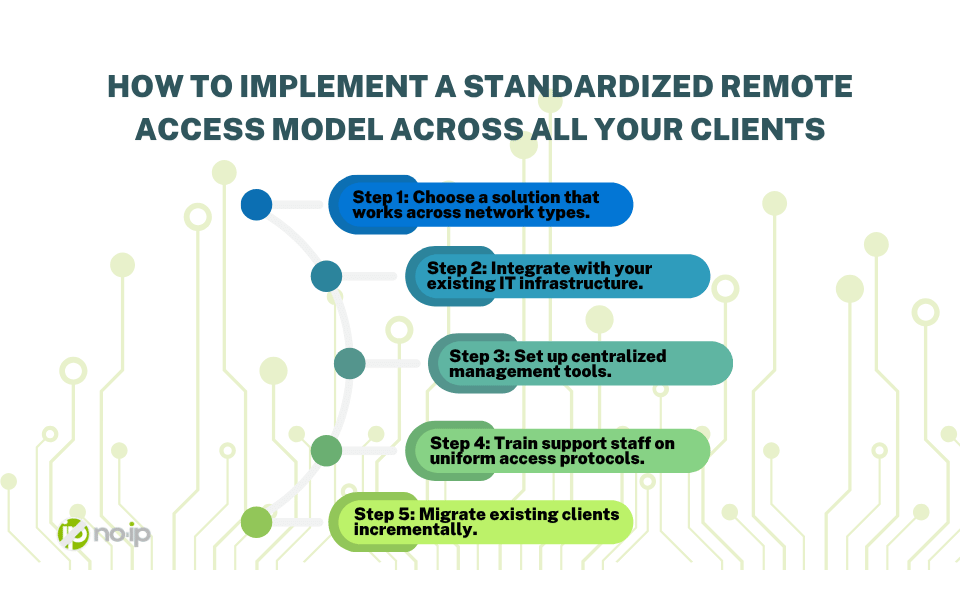
How to Implement a Standardized Remote Access Model Across All Your Clients
Transitioning to a standardized remote access model doesn’t require rebuilding everything at once. A phased approach lets MSPs capture the benefits while managing the transition across an existing client base.
Step 1: Choose a solution that works across network types. The foundation of a standardized model is a remote access solution that doesn’t depend on network conditions you can’t control.
Step 2: Integrate with your existing IT infrastructure. Evaluate how the chosen solution fits into your current RMM tools, ticketing systems, and monitoring platforms. API access and integration capabilities determine how well remote access fits into the workflow.
Step 3: Set up centralized management tools. Consolidate remote access management into a single platform rather than managing client environments individually, which makes the model scalable.
Step 4: Train support staff on uniform access protocols. A standardized model only delivers its benefits if the team applies it consistently.
Step 5: Migrate existing clients incrementally. Start new client onboarding on the standardized model immediately. Migrate existing clients during scheduled maintenance windows or when current access configurations need to be updated anyway.
The Future of Remote Access for MSPs
Remote access models built on inbound connectivity are going to keep running into these restrictions. Solutions that are designed to route around them are becoming a practical option for MSP environments.
Zero Trust network access (ZTNA) principles align with outbound tunnel-based remote access. Access is granted based on identity and policy rather than network position, and connections are authenticated and encrypted at the session level. As client security requirements evolve and compliance frameworks increasingly reflect Zero Trust principles, MSPs operating on an outbound-first remote access model are already aligned.
Standardizing Remote Access Is the Key to MSP Efficiency and Growth
Every client-specific exception, custom configuration, and access method that only works on certain networks is overhead that limits how far the team can grow before it runs out of capacity.
No-IP Public Tunnels and the No-IP MSP Multi-Tenant Platform are built for MSPs operating at that level of scale and consistency. If you’re managing remote access across a growing client base and looking for a model that scales without adding proportional overhead, now is the time to make the shift.
Learn how to get early access to No-IP Public Tunnels and be among the first MSPs to adopt a remote access model built for the way modern networks actually work.