What Is BIND?
BIND (Berkeley Internet Name Domain) is the most widely used open-source software implementation of the Domain Name System (DNS). In simple terms, BIND is one of the core technologies that allows human-readable domain names– like example.com– to be translated into IP addresses that computers use to communicate.
Originally developed in the early 1980s at the University of California, Berkeley under a DARPA research grant, BIND has grown from a graduate student project into the foundational DNS software that powers much of the modern internet. Today, it serves as both a reference implementation of DNS standards and production-grade software capable of handling high-volume, high-reliability workloads.
Because it was the first widely adopted DNS implementation and remains standards-compliant, BIND is deeply familiar to generations of network engineers and system administrators, and it continues to be a critical building block of internet infrastructure.
What Is DNS and Why BIND Matters
The Domain Name System (DNS) is a distributed, hierarchical system that:
- Defines how domain names are structured
- Delegates authority for managing those names
- Resolves domain names into IP addresses
DNS operates as a global tree, with authority delegated at each level. BIND doesn’t sit in that hierarchy, it implements it. The software provides the tools that allow organizations to manage DNS zones, delegate authority, and resolve queries in a way that complies with published internet standards.
Because DNS is a core communications protocol, it is also a potential target for attacks such as cache poisoning, spoofing, or interception. BIND 9 addresses this reality with a robust set of security features, including DNSSEC support, access controls, and extensive logging, making it suitable for secure, mission-critical environments.
Who Uses BIND?
BIND is commonly used by:
- Internet service providers (ISPs)
- Enterprises running internal or external DNS infrastructure
- Universities and research institutions
- IT teams managing private networks and lab environments
Organizations using BIND are often in the IT and technology sectors and range from mid-sized businesses to large enterprises. Many choose BIND because it is open source, cost-effective, and provides complete control over DNS behavior.
How BIND Works in DNS Resolution
BIND 9 is a complete implementation of the DNS protocol and can serve multiple roles:
- Authoritative name server (answers DNS queries for domains you own)
- Recursive resolver (finds answers on behalf of clients)
- Stub resolver (on supported systems)
Large operators typically dedicate servers to a single role, while smaller organizations often configure BIND to perform multiple functions on the same system. This flexibility makes BIND powerful, but it also increases the complexity of setup and maintenance.
Key Features and Capabilities of BIND
BIND provides a deep level of control over DNS infrastructure, including:
- Zone File Management
Create and manage DNS records such as A, AAAA, MX, CNAME, and TXT records. - DNSSEC Support
Cryptographically sign DNS records to protect against tampering and spoofing. - Access Control Lists (ACLs)
Restrict who can query or update DNS data. - Logging and Monitoring
Detailed diagnostics for troubleshooting and auditing. - Dynamic Updates
Modify DNS records without restarting the server.
These features make BIND extremely influential, but they also require careful configuration, ongoing monitoring, and experienced administration.
Advantages of Using BIND
BIND remains popular for good reason. For one thing, it is a fully customizable DNS configuration that is especially enticing for more tech-savvy users. Because it is fully customizable, you have complete authority over your DNS data, putting all the power in your hands. When handled by a large, experienced user community, you have a wealth of knowledge you can use as ready support. Therefore, there are extensive documentations and open-source development surrounding BIND. Just doing a quick search online and you get a litany of helpful tools that have been honed for decades.
For growing businesses, BIND has proven scalability for enterprise environments, which greatly depend on low-risk solutions to managing DNS data.
Challenges and Limitations of BIND
Despite its strengths, BIND is not always the best choice for every organization. For one thing, BIND involves a complex setup that requires CLI and DNS expertise. Furthermore, it requires ongoing maintenance, patching, and monitoring. If you are not already well versed with BIND, setting up and managing your DNS configuration will end up being a tiring and overwhelming task. This constant monitoring may also pose a greater risk of human error leading to downtime or security issues. With great power comes great responsibility, and the same goes for your DNS configuration. Although BIND allows users to be more independent, that also includes manual configuration of secondary servers for redundancy and failover.
For many businesses, especially those without a dedicated DNS administrator, these challenges can outweigh the benefits of full control.
BIND vs Managed DNS: What’s the Difference?
There is a difference between BIND and Managed DNS: BIND is an open-source software you can host, configure, and secure yourself. Managed DNS, like the one that No-IP provides, Hosted service that delivers the same control but offloads the technical work.
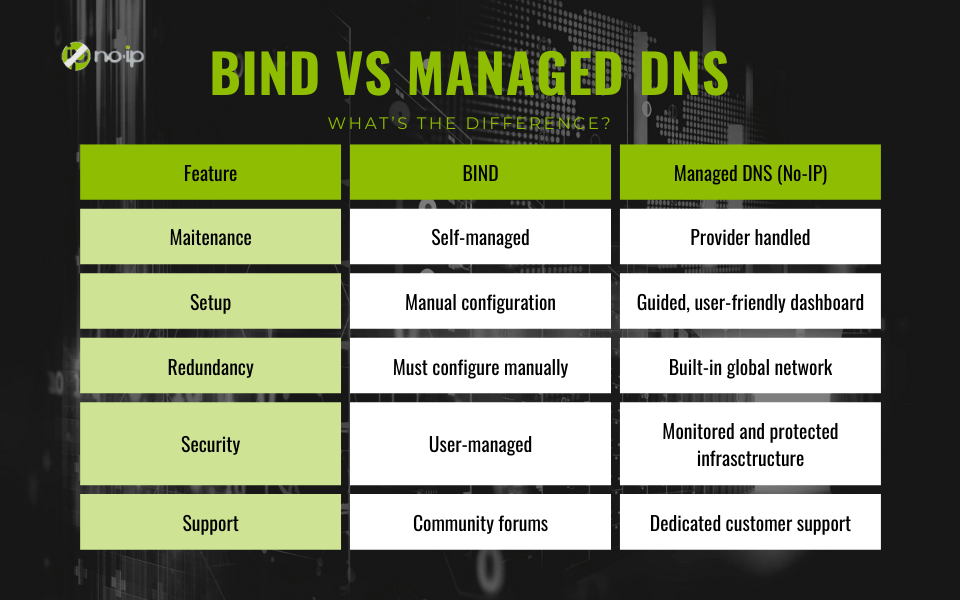
Both approaches are valid. BIND offers maximum control, while managed DNS prioritizes reliability, simplicity, and uptime. Both BIND and Managed DNS serve vital roles, BIND for control, managed DNS for simplicity and reliability. The key difference comes down to who manages the infrastructure.
When to Use BIND (and When Not To)
BIND is a strong choice when running internal corporate DNS, or supporting research, education, or lab environments. Basically a way of exercising as much control as possible over infrastructure that depends on extreme measures of privacy. This allows IT administrators to use BIND to test custom DNS configurations or protocols. Plus, those with DNS expertise in-house may prefer BIND as it has served as a foundational way of understanding and managing DNS configurations.
On the other hand, Managed DNS is often a better fit when uptime and resilience are critical. This might be a no-brainer, but think about how much money a business loses when they experience downtime, especially when their customers notice. If you need to manage multiple domains or remote devices consistently, then Managed DNS may be the better choice compared to BIND. on the premise that you lack a dedicated DNS administrator, for example you are a business that is still growing and don’t yet have the bandwidth or means to staff a Systems Administrator. Lastly, Managed DNS is a winning choice when you want to reduce operational risk and complexity. In other words, Managed DNS is easier to manage compared to BIND.
How No-IP Complements BIND Users
Many organizations use a hybrid approach, running BIND internally while relying on No-IP externally for redundancy, dynamic updates, or simplified domain management.
Even teams that self-host DNS benefit from a backup DNS provider. No-IP’s Secondary (Backup) DNS helps ensure availability if a primary server fails, while Dynamic DNS (DDNS) enables reliable access to changing IP environments.
For those who want to move away from self-managed DNS entirely, No-IP’s Managed DNS offers:
- A global Anycast network for high availability
- An intuitive, web-based DNS management interface
- Built-in redundancy and monitoring
- 24/7 support from DNS experts
Strengthening Your DNS Infrastructure with No-IP
BIND is a cornerstone of the internet and a powerful tool for organizations that need deep DNS control. But power comes with complexity. Managed DNS services like No-IP’s are built on the same DNS fundamentals, while removing much of the operational burden.
Whether you’re running BIND, supplementing it, or replacing it entirely, No-IP helps ensure your DNS infrastructure is reliable, secure, and easy to manage, so you can focus on running your business, not maintaining name servers.
FAQ
What is Bind Used for in DNS?
BIND (Berkeley Internet Name Domain) is the most widely used open-source software implementation of the Domain Name System (DNS). In simple terms, BIND is one of the core technologies that allows human-readable domain names– like example.com– to be translated into IP addresses that computers use to communicate.
Is BIND still relevant?
BIND is commonly used by:
- Internet service providers (ISPs)
- Enterprises running internal or external DNS infrastructure
- Universities and research institutions
- IT teams managing private networks and lab environments
Organizations using BIND are often in the IT and technology sectors and range from mid-sized businesses to large enterprises. Many choose BIND because it is open source, cost-effective, and provides complete control over DNS behavior.
How does BIND differ from Managed DNS?
There is a difference between BIND and Managed DNS: BIND is an open-source software you can host, configure, and secure yourself. Managed DNS, like the one that No-IP provides, Hosted service that delivers the same control but offloads the technical work. Both BIND and Managed DNS serve vital roles, BIND for control, managed DNS for simplicity and reliability. The key difference comes down to who manages the infrastructure.
Is BIND difficult to configure?
To put it bluntly, yes. BIND involves a complex setup that requires CLI and DNS expertise. That is why there are so much documentation available on configuring BIND because it requires a certain level of know-how to that typically takes years of understanding.
Can I use BIND and No-IP together?
Many organizations use a hybrid approach, running BIND internally while relying on No-IP externally for redundancy, dynamic updates, or simplified domain management.
Even teams that self-host DNS benefit from a backup DNS provider. No-IP’s Secondary (Backup) DNS helps ensure availability if a primary server fails, while Dynamic DNS (DDNS) enables reliable access to changing IP environments.