TL;DR:
- Traditional remote access relies on open inbound ports, which tend to require constant management and break down on modern networks where CGNAT and ISP-managed routers make inbound routing unreliable or impossible.
- Reverse tunnels have the managed device reach out to a relay, the technician connects to the same relay, and no inbound port ever opens on the client-side network.
- Using a model that does not include open ports means there are no firewall rules to maintain or dependency on a static IP, which makes the model easier to manage at scale.
- Reverse tunnels align with Zero Trust principles by design: access is on-demand, sessions are explicit, connections are encrypted, and there is no persistent open path between sessions.
- For MSPs, the operational benefit is immediate. Onboarding new clients and devices no longer requires touching network equipment, and CGNAT is no longer a variable to work around.
- No-IP’s Public Tunnels is a practical implementation of this model, providing stable URL-based access that works across CGNAT, ISP-managed routers, and dynamic IP environments without configuration changes on the client side.
If you manage client environments for an MSP or run IT for a growing business, you’ve had the ‘remote access’ conversation more times than you can count. Across dozens of clients, managing remote access compounds into a maintenance burden.
The good news is that there are solutions to better manage remote access for a company that is scaling upwards. One of those solutions is reverse tunnels, which is a model that provides reliable remote access without opening a single inbound port.
Why remote access traditionally requires open ports
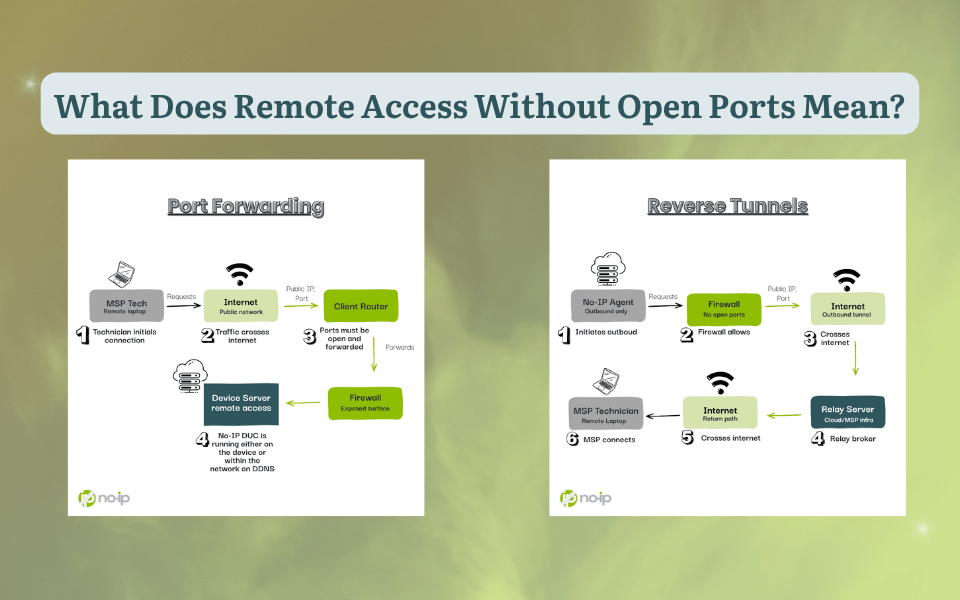
Remote access connects two endpoints: The technician’s machine and the device being managed. In port forwarding, the managed device sits inside a private network and waits for an inbound connection. For that connection to arrive, the router or firewall needs an explicit rule directing traffic on a specific port to that internal device. This model has been used for decades, and it was primarily used for remote access.
These days, it’s common to find client sites run ISP-managed routers that push back on custom configuration. Many residential and cellular connections sit behind Carrier-Grade NAT (CGNAT), where the device shares one IP with potentially hundreds of other subscribers. Some clients resort to Static IPs, but they end up being an upsell, not a default.
What remote access looks like without port forwarding
Reverse tunnels literally reverse the connection direction. Rather than waiting for inbound traffic, the managed device reaches outward and establishes a connection to a relay server. The technician connects to the same relay, and both sides meet in the middle. No inbound port opened, firewall rule changes, or dependency on a static IP.
With reverse tunnels, CGNAT, ISP-managed routers, and dynamic IP allocations stop being obstacles and become irrelevant. For a practical look at how this works,No-IP’s overview of Public Tunnels is a useful reference before going further.
The Possible Risks of Open Ports
Port Forwarding is not going anywhere. It is a traditional remote access model that has proven to be reliable and secure so long as the users managing it are knowledgeable and consistent, and it fits the configuration. That being said, like all things, port forwarding for remote management may carry some risks. For example, automated scanners identify open ports within minutes of them appearing. From that point forward, the device behind the port is at risk of unsolicited connection attempts from sources with no legitimate reason to be there, and those attempts are continuous, not occasional.
If the service behind an open port carries an unpatched vulnerability, that port is the delivery path for exploiting it. The firewall that would otherwise block unsolicited inbound traffic has been explicitly instructed to pass it through. The attack surface is as wide as the service you are exposing. That is why port forwarding needs to be managed by someone with experience and education.
Managing open ports at scale creates a second layer of operational risk. For example, not remembering to close ports opened for a one-time job, or firewall rules that are not being regularly implemented. When businesses are scaling up, rules that made sense for a ten-device network now serving fifty become harder to manage. At the MSP level, this problem multiplies across every client environment. Continuous monitoring becomes a requirement, change management becomes critical, and the complexity of managing ports grows faster than most teams can sustainably keep up with.
How Reverse Tunnels May Reduce Exposure
A reverse tunnel changes the fundamental direction of the connection. Rather than the managed device sitting passively and waiting for inbound traffic, it initiates an outbound connection to a relay server. The technician connects to that same relay, which brokers the session between both sides without either party needing a direct path to the other.
This architectural shift helps reduce exposure in three ways.
First outbound traffic is permitted through firewalls. A device establishing an outbound tunnel to a relay looks like standard traffic from the network’s perspective. Therefore, there are no rule changes needed, ISP calls, or waiting for someone with firewall access to be available. That already saves a lot time and money on overhead.
Second, with no open inbound ports, there is no externally visible attack surface on the client-side network. If nothing is listening for inbound connections, there is nothing for a scanner to find, and no delivery path to exploit.
Third, and most importantly, reverse tunnels solves the CGNAT issue. CGNAT operates at the ISP level, sitting above the client’s network and making it impossible to route unsolicited inbound traffic to a specific subscriber. A reverse tunnel established from inside the network bypasses the restriction entirely. The same principle eliminates double NAT issues and the complications introduced by ISP-managed routers.
Zero Trust and Remote Access Without Open Ports
Zero Trust is built on one operating principle: trust nothing and verify everything, regardless of whether a device is inside or outside the network perimeter. Every connection request gets verified, access is granted on-demand, and it is revoked when the session ends.
Port forwarding conflicts with Zero Trust at the architectural level. The firewall cannot distinguish a legitimate technician from an automated scanner, so the entire burden of access control falls on the service behind the port.
Reverse tunnels align with Zero Trust. There is no persistent open path and the tunnel exists only when a connection is explicitly initiated. That means there is no standing exposure between sessions. Access is strictly on-demand, and when the session closes, the access path closes with it. Tunnel connections also encrypt traffic in transit by default, protecting data integrity across whatever networks the traffic traverses to reach the relay.
For organizations moving toward a full Zero Trust framework, outbound tunnels provide the infrastructure foundation to build on. The hardest part of that transition is moving away from port forwarding. Layering on identity-based controls and continuous verification becomes the next step rather than the starting point. Thankfully, No-IP Public Tunnels is built with that progression in mind.
Advantages of Remote Access Without Open Ports
Improved Security Posture
Compliance is easier to manage and becomes more straightforward when you don’t have open ports. SOC 2, HIPAA, and PCI-DSS all require organizations to minimize unnecessary network exposure and maintain documented access controls. A reverse tunnel model makes that documentation easier to follow. Access then requires an explicit session, sessions are logged, and there are no persistent inbound rules to audit.
Simplified Network Management
Every new access requirement in port forwarding means a configuration change on the client’s router or firewall. At the MSP scale, that translates to managing equipment across dozens of environments, each with its own set of hardware, credentials, and change management processes.
For these cases, reverse tunnels may be a better fit to remove that dependency entirely. Adding a new managed device does not require a firewall change. Onboarding a new client site does not require a site visit or a remote session to the client’s network equipment. When IP addresses indefinitely change, nothing breaks because the connection model never relied on a stable IP to begin with. The operational overhead per client goes down as the fleet grows.
Use Cases for Remote Access Without Open Ports
Service Providers. MSPs eliminate per-site inbound configuration entirely. Technicians reach any managed device through the relay without needing to know or manage what is happening on the client-side network.
Remote IT Support. The access path is already in place before the support ticket opens. Technicians connect, resolve the issue, and the session closes. That means no firewall changes, IP lookups, or waiting.
Small-to-Medium Enterprises. Distributed teams get reliable access to on-premises resources without exposing a VPN concentrator or management interface to the public internet.
The Future of Remote Access Without Open Ports
CGNAT adoption continues to expand, and ISP-managed routers are the default across residential and small business deployments. Zero Trust is a model that moves from an enterprise security concept to an SMB operational expectation. Each of these trends makes reverse tunnel access increasingly popular.
The next step in this evolution is Protected Tunnels, which is the outbound infrastructure layered with identity-based access controls and multi-factor authentication. Rather than a tunnel accessible to anyone with the URL, access requires verified identity before a session is brokered. That is ZTNA made practical for the environments MSPs and SMBs actually operate in, and it is where the category is headed.
How to Get Started With Remote Access Without Open Ports
Evaluate your current setup
Map how technicians reach managed devices today. Identify which connections break when an IP changes or a firewall rule gets modified. Count the open ports across your client environments and ask honestly whether each one is still necessary.
Adopt outbound-only access
Start with No-IP Public Tunnels for new client onboarding and run it alongside existing methods while you build confidence in the model. Migrate existing environments as the opportunity arises.
Plan for Zero Trust
Document access patterns now, which technicians reach which devices, under what conditions, with what level of authorization. That documentation becomes the policy layer when identity-based controls are ready to implement. The infrastructure is already in place. The policy work is what comes next.
How No-IP’s Public Tunnels Can Help
No-IP’s Public Tunnels is a practical implementation of the outbound tunnel model built for these environments. Each tunnel gets a stable, URL-based address that stays consistent regardless of IP changes on the client side. Deployment is a tunnel client install on the managed device, not a configuration session on client network equipment. Because the connection is outbound-initiated, it works across CGNAT, double NAT, and ISP-managed routers without any special handling.
No-IP Public Tunnels is launching SOON! Learn how to get early access and be among the first to adopt this modern remote access solution.