By Hazel Salinas · Last updated: October 2026
TL;DR
Dynamic DNS (DDNS) is a service that automatically updates a hostname’s DNS record whenever your public IP address changes. Most ISPs assign dynamic IPs that change over time. DDNS keeps one name, like myhome.ddns.net, pointed at your current IP so you can reach your network from anywhere.
- What DDNS means: DDNS stands for Dynamic DNS. It links a fixed hostname to a changing IP address, so you never have to look up your IP again.
- How DDNS works: An update client on your router or computer checks your public IP every few minutes. When the IP changes, the client tells the DDNS provider, which updates the hostname’s A record. A short TTL (about 60 seconds) means visitors reach the new IP within minutes.
- Who needs it: You need DDNS if you want remote access to cameras, a NAS, a media server, remote desktop, or a VPN, and your ISP gives you a dynamic IP.
- Who doesn’t: If you only browse and stream, already have a static IP, or use a cloud app that handles remote access, you can skip it.
- DDNS vs. static IP: A static IP never changes but usually costs extra every month. DDNS gives you a stable hostname on the IP you already have.
- Limits: DDNS doesn’t replace port forwarding or good security. Behind CGNAT (Carrier-Grade NAT), common on mobile and satellite networks, you need a tunnel instead.
You set up a security camera, a game server, or a media server at home. It works fine on your Wi-Fi. Then you try to reach it from work, and the connection fails. The usual cause is that your internet service provider (ISP) changed your public IP address, and nothing told the outside world where your network went. Dynamic DNS fixes that.
What Is Dynamic DNS?
Dynamic DNS (DDNS) is a service that automatically updates a domain name to point to your device’s current IP address. Your IP can change as often as it likes, and you keep using the same hostname to reach your network.
Most home and small-business internet plans come with a dynamic IP, which means your ISP can change it at any time. You can ask your ISP for a static IP that never changes, but it usually costs extra every month. DDNS gives you the same practical result, a stable address for your network, without paying for a fixed IP.
To keep the hostname current, DDNS relies on a small piece of software called an update client. It runs on your router or on a computer on your network. Here’s more on what a Dynamic Update Client (DUC) is.
For No-IP-specific setup details, see How No-IP Dynamic DNS works and how to set it up.
How Does DDNS Work?
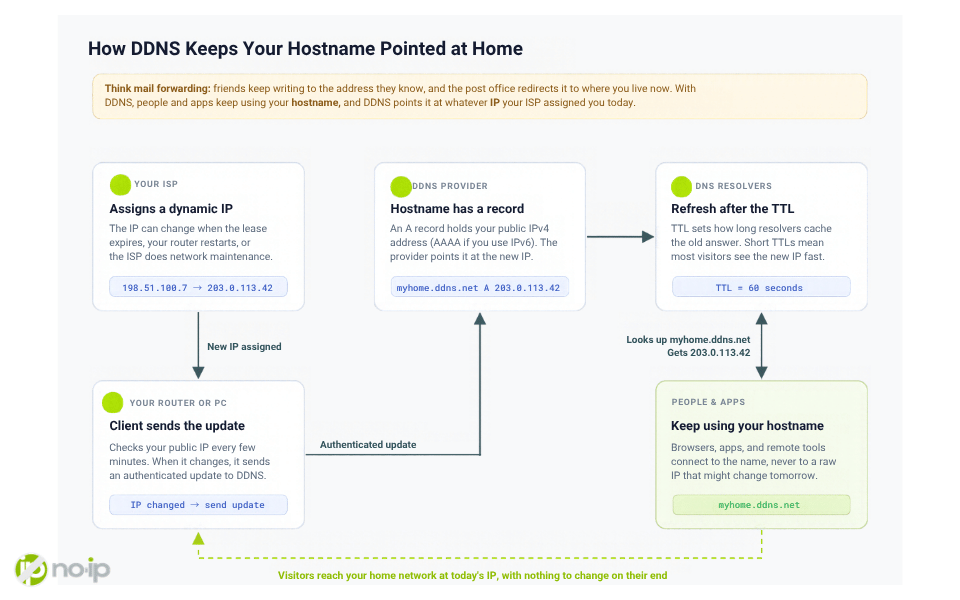
Think of DDNS like mail forwarding when you move house. Your friends keep sending letters to the address they know, and the post office quietly redirects them to wherever you live now. With DDNS, people and apps keep using your hostname, and DDNS points it at whatever IP your ISP assigned you today.
Under the hood, four parts work together.
- Your ISP assigns a dynamic IP. The address can change when the lease expires, when your router or modem restarts, or when the ISP does maintenance on its network.
- Your hostname has a DNS record. Your hostname (for example, myhome.ddns.net) has an A record that holds your current public IPv4 address, or an AAAA record if you use IPv6.
- The update client sends the change. A DDNS client on your router or on a computer on your network checks your public IP every few minutes. When the IP changes, the client sends an authenticated update to the DDNS provider, and the provider points the record at the new address.
- Resolvers pick up the new IP after the TTL expires. The record’s TTL (time to live) tells DNS resolvers how long they can cache the old answer. DDNS providers use short TTLs, often about 60 seconds, so most visitors reach the new IP within a few minutes.
The result: anyone who types your hostname reaches your network, typically within minutes of an IP change.
Want the No-IP side of the process? Read how No-IP Dynamic DNS works. Ready to set it up? Our knowledge base covers the three ways to keep your hostname updated.
Why Do Some IP Addresses Change?
Most ISPs hand out addresses through DHCP (Dynamic Host Configuration Protocol). DHCP gives your router a lease on an IP for a set period. When the lease ends, the ISP can renew the same address or recycle it and give you a different one. Restarting your modem, a power outage, or ISP network maintenance can all trigger a new address. Here’s a closer look at what a dynamic IP address is.
The bigger reason is supply. There are far fewer IPv4 addresses than connected devices, so ISPs reuse and rotate them across customers. Dynamic assignment lets an ISP serve more subscribers from the same pool and balance traffic across its network.
Many ISPs also place customers behind carrier-grade NAT (CGNAT), where one public address is shared by many homes. In that case your address may change often, and inbound connections may not reach you at all. See What is a CGNAT IP address? for how to tell if you’re affected.
Do You Need Dynamic DNS?
Signs you need DDNS:
- You want remote access to cameras, a NAS, remote desktop, a game server, or a VPN endpoint
- Your IP changes, and you don’t want to pay for a static one
Signs you probably don’t:
- You only browse and stream
- Your provider already gives you a static IP
- You use a cloud-managed camera or app that handles remote access for you
When DDNS isn’t enough: with CGNAT, or when you can’t set up port forwarding, DDNS alone can’t reach your network. The hostname still points at the right public IP, but that IP doesn’t lead back to your router. No-IP Public Tunnels works around that from a computer on your network, so nothing has to come in through the router. Not sure whether you’re behind CGNAT? Read What is a CGNAT IP address?
What Are the Use Cases for Dynamic DNS?
The classic use case is remote network access. You’re away from home and want to check your security cameras, stream from your media server, or adjust a smart device. DDNS gives you one hostname to connect to, no matter what IP your ISP handed out this week.
Home users
- Media server: Stream your movie or music library from a Plex or Jellyfin server at home while you travel. Your phone’s Jellyfin app connects to mymedia.ddns.net from a hotel.
- NAS or personal cloud: Reach a Synology, QNAP, or Nextcloud box from anywhere to grab a file or confirm that phone photo backups are running.
- Home automation hub: Control a self-hosted Home Assistant from outside the house without paying for its cloud subscription, like checking from work whether you left the garage door open.
- Security cameras: Check a camera or NVR feed while you’re away. Our security camera guide covers how to set it up safely.
- Remote desktop and Wake-on-LAN: Wake a sleeping home PC, then connect to software or files that live only on that machine.
Small business
- Office server: Staff working from home reach on-site accounting software, file shares, or a database through a VPN to the office’s DDNS hostname. Many small offices run on business broadband without a static IP, or don’t want to pay extra for one.
- Site-to-site VPN: Connect two branch offices that both have dynamic IPs. Each router points the tunnel at the other office’s hostname, so the tunnel rebuilds itself after either IP changes.
- Shop CCTV: A shop owner checks recorded video at night through the NVR’s hostname. Connect through a VPN here too.
- On-site VoIP: Remote phones register to a FreePBX or 3CX system at the office by hostname.
Developers, IT, and home lab
- SSH into a home lab: Run ssh [email protected] from anywhere instead of checking which IP your home has today.
- Self-hosted server: Friends connect to your home web or game server by hostname, so a new IP after a router reset doesn’t break their link.
- VPN server: Your VPN server runs on your home router. Your laptop connects to one hostname from any hotel or café, with no settings to edit when the IP changes.
- IoT devices: A sensor or camera at a holiday home reports to a hostname you control, so you can still reach it after an outage resets the IP.
- Webhooks and demos: Point a webhook from a service like Stripe or GitHub at your hostname to test code running at home. Tunneling tools also do this. DDNS makes the most sense when you want a hostname that doesn’t change.
- Allowlisting a dynamic IP: Some firewalls and cloud security rules accept a hostname instead of an IP, so your home connection keeps access to a cloud server’s admin port after your IP changes.
- IT support for clients: Managed service providers (MSPs) set up DDNS on each customer’s router so they can reach every site by name for remote management.
DDNS vs. Static IP
A static IP is a fixed public address from your ISP. It never changes, and it typically costs extra every month. DDNS gets you a stable hostname on the dynamic IP you already have, which covers most remote-access needs for a fraction of the price. For a full breakdown of where each one wins, read Dynamic DNS vs. Static IP.
Compare your options
| Option | What it does | Best when | Read more |
|---|---|---|---|
| Dynamic DNS | Keeps a hostname pointed at your changing IP | You want remote access without paying for a static IP | How No-IP Dynamic DNS works |
| Static IP | A fixed public address from your ISP | You need one permanent address and the extra cost is fine | Dynamic DNS vs. Static IP |
| VPN / Zero Trust | A private, encrypted route into a network | You need controlled access for a team or many devices | Zero Trust vs. VPN for MSPs |
| Secure tunnel | Reaches your device without opening router ports | You’re behind CGNAT or have no router access | No-IP Public Tunnels |
Dynamic DNS with No-IP?
No-IP has provided dynamic DNS for 25+ years, with free and paid plans, a knowledge base, and U.S.-based support. Ready to try it? Set up No-IP Dynamic DNS.
FAQs
Do I need dynamic DNS at home?
You need dynamic DNS at home if you want to reach something on your network from outside, such as cameras, a NAS, a media server, or a game server, and your ISP gives you a dynamic IP.
Is dynamic DNS better than a static IP?
For most home users and small offices, yes. DDNS gives you a stable hostname on the IP you already have, while a static IP usually adds a monthly fee. A static IP makes more sense when a service requires one fixed address, like some mail servers. See Dynamic DNS vs. Static IP for the full comparison.
Can I use dynamic DNS with CGNAT?
Not on its own. Under CGNAT, your ISP shares one public IP across many customers, so DDNS can point a hostname at that IP but inbound traffic can’t find your router. A tunnel solves this by connecting outbound from your device. No-IP Public Tunnels is built for that case.
Is dynamic DNS safe for security cameras?
DDNS itself only updates an address, so the risk sits with the camera you expose. Don’t forward a camera’s port straight to the internet.
Do I need dynamic DNS if I already use a VPN?
If your VPN server runs at home or in the office on a dynamic IP, yes. Your VPN clients need a stable address to connect to, and a DDNS hostname gives them one that survives IP changes. If you use a VPN service that connects through the provider’s cloud, it already handles the addressing, and you don’t need DDNS for that.