Why Organizations Are Searching for Alternatives to Port Forwarding
IT teams are actively looking for alternatives to port forwarding not because port forwarding is broken, but because the environments they’re deploying into have changed or it is not the best fit for the type of access needed.
Port forwarding still works in the right conditions and it’s a perfectly valid remote access method. The real question is whether those conditions actually exist in the networks you’re managing.
Let’s break down both approaches so you can make the right call for each deployment.
What Is Port Forwarding?
Let’s go back to basics: Port forwarding is an inbound mapping rule managed at the router level. An external client sends traffic to your public IP on a specific port, your router receives that request, and sends it to a designated internal device, and the connection is complete.
Three things are needed to make port forward work:
- A public IP address assigned to your connection
- Admin access to the router to configure the forwarding rules, and
- Firewall rule changes that allow inbound traffic on the relevant ports
Port forwarding is a method of connection for legitimate use cases, such as home labs, self-hosted applications, and stable office networks where the infrastructure is known and controlled. The problems start when those conditions aren’t met. For a full breakdown,check out our port forwarding FAQ here.
When Port Forwarding Works Well
Port forwarding is a reliable solution for the right parameters. That is based on two things.
Public IP Address
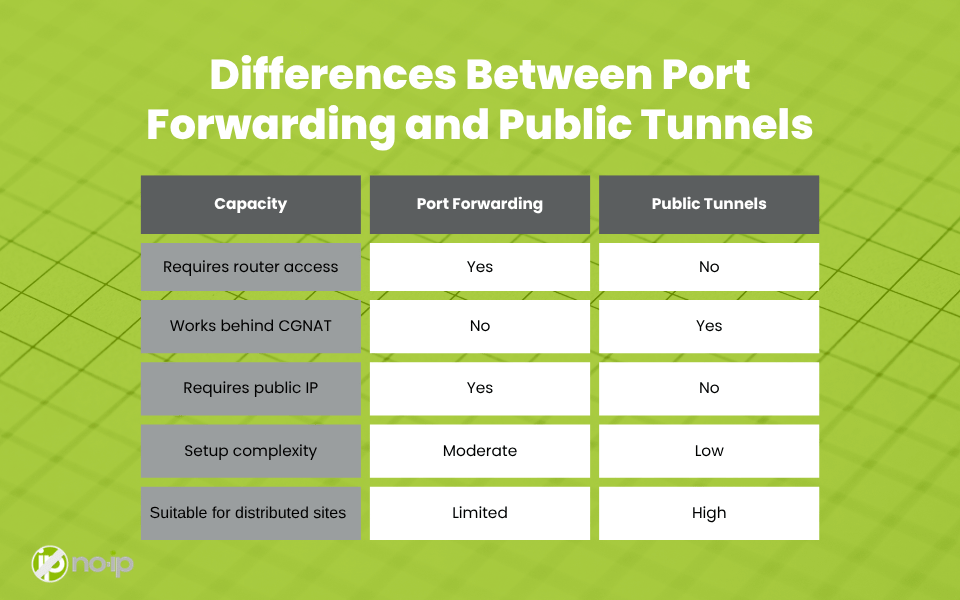
Port forwarding requires a genuine, routable public IP address assigned directly to your connection. This mean no CGNAT or shared addressing. If your WAN IP matches what an external site like WhatIsMyIP.com returns, you’re in good shape. If it doesn’t, port forwarding won’t work regardless of how perfectly you’ve configured the rules.
Full Router Control
Not only do you need administrative acces to the local network, but you need access to the router. If the router is managed by an ISP, locked down, or sitting behind another NAT layer, then port forwarding rules are not an option.
Controlled Network Environment
Port forwarding is a great means of connection for predictable and centralized environments. For example, a corporate office with known infrastructure, a home lab equipped with a single router, or a network where you have full access and control over every layer. However, the more variability the environment has, the harder port forwarding is to manage.
In other words, if you have a public IP and control of the router, port forwarding works like a charm. If either of those is missing, you’re not going to be able to make a remote connection.
Why Organizations Look for Alternatives to Port Forwarding
Here’s where port forwarding is not the right fit for a network.
Carrier-Grade NAT (CGNAT)
CGNAT is increasingly common across residential broadband, cellular, and satellite connections. When an ISP uses CGNAT, your router’s WAN IP becomes a private address, not a public IP. Your traffic shares a public IP with potentially hundreds of other subscribers, and the ISP’s NAT layer has no mechanism to route inbound traffic to a specific subscriber. Port forwarding rules on your router are completely irrelevant at that point because the problem is a layer above you that you have no access to.
ISP-Managed Routers
You can’t configure what you can’t access: By default, a significant portion of residential and small business internet connections come with ISP-provided routers that are locked down. This means admin access is restricted and port forwarding is either disabled or not supported outright.
Firewall Restrictions
Enterprise and SMB environments usually operate under default-deny inbound policies. This means inbound traffic is blocked unless explicitly allowed. Getting firewall rules changed in these environments often requires change management approvals, security reviews, and coordination with teams outside your control. For example, for MSPs managing client networks, this is a frequent pain point.
Multi-Site Complexity
When it comes to distributed deployments, port forwarding doesn’t scale well. Every site requires its own manual setup. This includes different:
- routers,
- admin interfaces,
- firewall configurations,
- ISPs.
There is no standardized rulebook for creating remote access everywhere, and every new client deployment becomes its own troubleshooting adventure. For MSPs managing dozens or hundreds of endpoints, that overhead adds up fast.
What Are Public Tunnels?
Public tunnels is flipped. Instead of waiting for an inbound connection to arrive, which requires a public IP and open ports, the device inside the network initiates an outbound connection to a managed external endpoint.
Here’s why that matters: outbound traffic is rarely blocked. None of the Firewalls, CGNAT, or ISP-managed routers restrict outbound connections the way they restrict inbound ones. Then, once that outbound tunnel is established, the platform brokers access for remote clients through the managed endpoint. That means no open ports, public IP requirement, or outer configuration required.
Fundamentally, it’s a different architecture that’s designed for the way modern networks actually behave rather than the way we wish they did.For a deeper look at how No-IP Public Tunnels work specifically, this post covers it in detail.
Inbound vs. Outbound Access
The direction of the initial connection is the core difference between port forwarding and public tunnels.
Inbound Model: Port Forwarding
An external client initiates a connection to your public IP on a specific port. Your router intercepts the request, matches it to a forwarding rule, and sends it to the correct internal device. The entire model depends on your perimeter being reachable — which means a public IP, open ports, and a router that will cooperate.
Outbound Model: Public Tunnels
In the Outbound model, the ISP infrastructure never has to cooperate. Your internal device reaches out and establishes a connection to an external relay endpoint. When a remote client needs access, they connect to that managed endpoint instead of directly to your IP. The platform handles the routing between the remote client and your device through the existing tunnel. No inbound routing is required or perimeter exposure is needed.
Differences Between Port Forwarding and Public Tunnels
When to Choose Each Method
Choose Port Forwarding When:
- You have full administrative control over the router
- A legitimate public IP is assigned to the connection with no CGNAT
- The network is simple, centralized, and well-understood
- Direct inbound connections are prioritized and the infrastructure supports them
Choose Public Tunnels When:
- You don’t control the router or can’t modify firewall rules
- The connection is behind CGNAT or lacks a true public IP
- You’re deploying to distributed or multi-site environments where port forwarding can’t be configured consistently
- Standardization across client deployments matters. One repeatable setup that works regardless of what the underlying network looks like
- Simpler deployment and reduced per-site setup overhead is a priority
Choosing the Right Remote Access Model for Modern Networks
Most networks don’t follow a single predictable pattern. One client might have a straightforward office network with a static public IP and full router access. Another one might be on a residential ISP with CGNAT, a locked-down modem, and a firewall policy you can’t modify. The one after that might be a distributed operation with a dozen sites, each with its own ISP and network configuration.
Inbound access, the foundation that port forwarding relies on, is no longer as common as it used to be. Outbound tunnel-based access is a better fit with the restrictive, variable environments that are increasingly the norm rather than the exception.
Let’s make one thing clear: Port forwarding is not going to be obsolete. In controlled environments where the conditions are right, it’s still a legitimate and effective method. However, the right remote access model is determined by the network conditions you’re actually working with, not by habit or preference. Understanding both approaches and knowing exactly when each one applies is what separates a reactive troubleshooting approach from a scalable, repeatable remote access strategy.
No-IP Public Tunnels is launching SOON! Learn how to get early access and be among the first to adopt this modern remote access solution.