Ordinarily, you can securely access your network via a remote connection. However, if your internet service provider (ISP) randomly assigns you a new IP, this connection may fail. A dynamic domain name system (DDNS) helps establish a reliable connection with your network, device, or server. It points an easy-to-remember hostname to your dynamic IP address, allowing fast and secure IP remote access.
Some typical scenarios where you need remote access are trying to access your computers or cameras while traveling, hosting a game server, running services like FTP or web servers. If you want devices outside your network to talk to devices inside your network, port forwarding is your solution.
Traditionally, much of remote access is built on Dynamic DNS and port forwarding: Port forwarding is a method of routing connections over the internet to a device on a local network. By configuring port forwarding, you can enable a variety of services such as remote access to a media server, hosting a game server, or self-hosting a website.Today, however, that model can be difficult to apply to certain configurations.
Why and When Port Forwarding Isn’t a Good Fit
The Network Environment Has Changed
Like all things, port forwarding has its strengths and weaknesses. There are some configurations where port forwarding is a perfect connectivity solution, and others where it does not.
Modern networks are more restrictive, distributed, and often outside the administrator’s control, making inbound connectivity difficult or impossible. For example, there has been a rise of ISP-managed routers, locked-down firewalls, and remote installations. Many environments don’t allow inbound rule changes.
As a result, organizations are increasingly seeking port forwarding alternatives that align with modern network realities.
CGNAT and Shared IP Addressing
CGNAT, also known as CGN, stands for Carrier Grade Network Address Translation. It is used by Internet Service Providers (ISPs), predominantly mobile and Satellite carriers, to allow numerous devices to coexist and share a small number of public IP addresses. CGNAT also offers a higher tier of security compared to NAT and offers a higher tier of security compared to NAT.
Unfortunately, inbound connections fail even when configured correctly. This is primarily because CGNAT involves sharing a single public IP address among multiple users, which can interfere with applications that rely on direct incoming connections or unique IP addresses.
Sometimes, admins don’t realize they’re behind CGNAT until troubleshooting.
Operational Friction
Configuring port forwarding is not quick and easy. It is a more involved process. Every sit requires router configuration. The port rules must be tracked and maintained. There is also a large dependency on customer network access. There is also increased support time and coordination when it comes to troubleshooting.
What Is Remote Access Without Port Forwarding?
Think about remote access without port forwarding:
- No open inbound ports
- No router configuration required
- No dependence on static public IPs
Outbound-only connectivity is exactly what it sounds like: your service can call out to the internet, but nothing on the outside can initiate a connection back in. No open inbound ports, no public endpoints, and far less opportunity for unsolicited traffic to hit your system. Your backend stays effectively hidden while still being able to talk to third-party APIs, other microservices, or cloud resources.
When you design your network this way, you stay in control of the conversation. Your service initiates the requests, and everything else is ignored. That means tighter firewalls, simpler security groups, and a dramatically smaller attack surface. Random scans and connection attempts from the internet just bounce off because there’s nothing listening.
There’s a compliance upside too. Since your infrastructure isn’t accepting inbound connections at all, you eliminate an entire category of exposure. Fewer open paths, fewer rules to manage, and a cleaner story when it comes time to explain your security model.
As environments grow, port forwarding can start to feel like extra baggage. Every rule has to be created, tracked, and updated as networks evolve. And each open port adds another thing to monitor from both a security and maintenance perspective. For MSPs juggling multiple customer environments, that overhead can pile up fast.
That’s where No-IP Public Tunnels comes in. Instead of relying on inbound ports or router changes, it provides a way to establish reliable remote access even in networks where port forwarding isn’t possible. At the same time, it doesn’t force you to abandon port forwarding entirely– you can still use it in places where it makes sense and keep tunnels as the flexible alternative when it doesn’t.
How Public Tunnels Work
Step 1: Outbound Tunnel Initiation
No-IP Public Tunnels offers a modern way to handle remote access. It lets you securely reach devices, services, or applications using a simple, shareable URL without having to open inbound ports on your network.
Instead of exposing a device directly to the public internet, the connection starts from inside your network. An outbound, encrypted tunnel is created and linked to a secure access platform. When someone needs access, that platform brokers the connection through the tunnel—so the service stays private while still being easy to reach when needed.
From the end user’s perspective, the experience is designed to be simple. Instead of dealing with IP addresses, firewall rules, or router settings, access happens through a straightforward browser-based URL.
Behind the scenes, all the tricky networking details like NAT traversal, dynamic IP changes, and firewall behavior are handled automatically. That layer of abstraction is what makes Public Tunnels so appealing, especially in modern environments where systems and teams are often distributed.
Step 2: Secure Tunnel Establishment
That tunnel connects to a secure access platform that only establishes a connection when someone actually requests access. And unlike developer-centric tunneling tools that are built for quick, short-lived testing sessions, Public Tunnels is designed for always-on access to real devices and services.
In real-world environments, this approach shines in the situations where traditional remote access tends to fall apart.
Step 3: Browser-Based Access
No-IP Public Tunnels provides a modern way to handle remote access. It lets customers securely reach devices, services, or applications through a simple, shareable URL—without needing to open inbound ports on the network.
For end users, the experience is intentionally straightforward. Instead of dealing with IP addresses, firewall rules, or router configurations, they just open a browser and use a URL.
When Public Tunnels is Compatible
Works Behind NAT and CGNAT
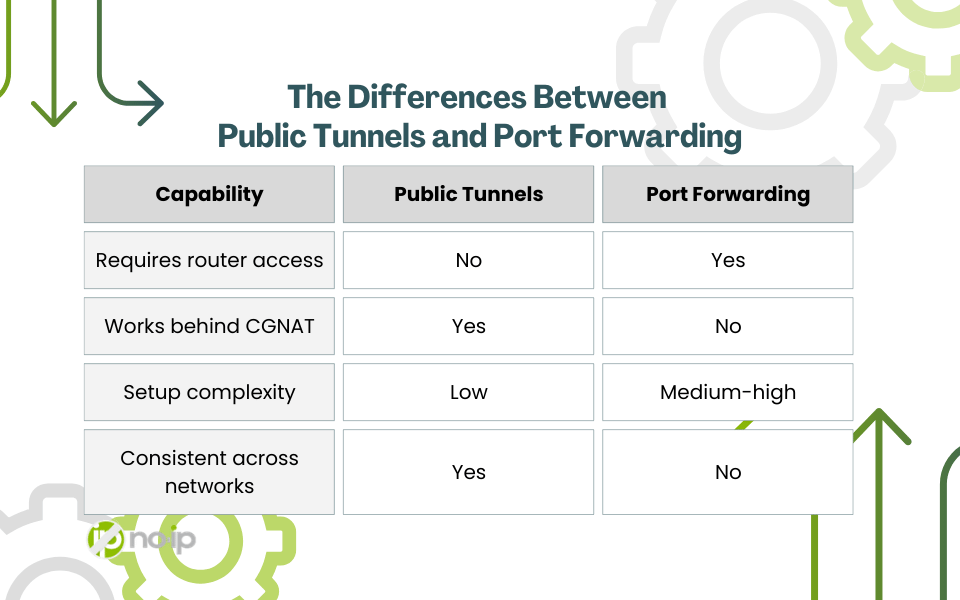
This shift in architecture comes with some real practical benefits. For starters, setup is much quicker since there’s no need to coordinate router changes or involve an ISP. Access also stays consistent no matter where the device is deployed, whether that’s in a corporate office, at a customer site, or in a remote installation.
Troubleshooting gets easier too. Because connectivity doesn’t rely on external factors like router configurations or network quirks, there are simply fewer variables to worry about when something needs to be fixed.
Works in Restricted or Managed Networks
Not only is router login not necessary, but access happens through a browser-based URL rather than IP addresses, firewall rules, or router configurations. Behind the scenes, the complexity of NAT traversal, dynamic IPs, and firewall behavior is handled automatically. This abstraction is what makes Public Tunnels especially compelling for modern, distributed environments.
Public Tunnels Are Predictable Across Environments
With connectivity, consistency and predictability are key. Public Tunnels provides the same access method whether:
- Corporate office
- Retail location
- Customer site
- Schools
Real-World Use Cases
For MSPs and B2B IT teams, consistency is one of the most valuable qualities a remote access solution can have. Supporting customer environments often means working with networks you didn’t build– ones with changing conditions, limited admin access, and very different security policies. Public Tunnels helps smooth out that variability by offering a single access method that works the same way across environments.
That consistency quickly turns into real operational efficiency. Onboarding new customers is faster because you’re not waiting on router changes or network reconfiguration. Support sessions tend to be shorter too, since fewer problems come down to blocked ports or misconfigured firewalls. Teams can also provide access through shared or custom domains without touching router settings, which makes it especially handy for troubleshooting or temporary support access.
By reducing friction at every step of the access process, No-IP Public Tunnels lets MSPs spend less time dealing with connectivity headaches and more time focusing on the work that actually delivers value.
Here are a few example configurations:
- Supporting customer equipment remotely
- Accessing NAS systems in restricted networks
- Managing branch office servers
- Providing remote troubleshooting access without coordinating port rules
Public Tunnels vs Traditional Port Forwarding
When Should You Choose Public Tunnels?
Public Tunnels is especially useful in situations where traditional remote access methods fall short. They shine when you don’t control the network infrastructure—like at a customer site where router access is limited or unavailable. They’re also a practical fallback when port forwarding repeatedly fails due to ISP restrictions, NAT complications, or inconsistent firewall behavior.
For teams supporting multiple customer environments, reverse tunnels provide a consistent way to connect without needing to configure each network differently. And because they rely on outbound connections instead of inbound ports, they make it possible to standardize remote access across environments without depending on router-level changes.
Organizations that adopt No-IP Public Tunnels today are not only solving current connectivity challenges but also positioning themselves for the future of remote access.
There’s more than one remote access solution
Modern networks are a lot more restrictive than they used to be. Between ISP limitations, strict firewall policies, and increasingly locked-down routers, relying on inbound connectivity isn’t always realistic anymore. In those cases, port forwarding is not the right solution.
That’s why approaches that don’t rely on inbound ports are quickly becoming the practical standard. Solutions like Public Tunnels fit naturally into this shift. They provide a reliable operational model built for real-world network constraints, where you may not control the infrastructure or have the ability to change router settings. And rather than replacing existing tools, Public Tunnels works alongside technologies like Dynamic DNS, giving teams another flexible option for maintaining reliable remote access.